Skip to content

Changelog

New updates and improvements at Cloudflare.

Cloudflare Python SDK v5.0.0 Released

Full Changelog: v4.3.1...v5.0.0

This is a major release of the Cloudflare Python SDK. It drops support for Python 3.8, adds 11 new API services, introduces optional aiohttp backend support for improved async concurrency, and includes hundreds of type and method updates across the entire API surface.

Please review the breaking changes below before upgrading. A migration guide is available at v5.0.0 Migration Guide.

Breaking Changes

  • Python 3.8 is no longer supported. The minimum required version is now Python 3.9.
  • typing-extensions minimum version bumped from >=4.10 to >=4.14.

The following resources have breaking changes. See the v5.0.0 Migration Guide for detailed migration instructions.

  • abusereports
  • acm.totaltls
  • apigateway.configurations
  • cloudforceone.threatevents
  • d1.database
  • intel.indicatorfeeds
  • logpush.edge
  • origintlsclientauth.hostnames
  • queues.consumers
  • radar.bgp
  • rulesets.rules
  • schemavalidation.schemas
  • snippets
  • zerotrust.dlp
  • zerotrust.networks

Features

aiohttp Backend Support

The async client now supports an optional aiohttp HTTP backend for improved concurrency performance. Install with pip install cloudflare[aiohttp] and use DefaultAioHttpClient() as the http_client parameter.

Python 3.13 and 3.14 Support

Python 3.13 and 3.14 are now tested and supported.

New Services

The following top-level resources are new in this release:

Resource Client Path Description
AI Search aisearch AI-powered search capabilities
Connectivity connectivity Connectivity testing and diagnostics
Email Sending email_sending Email send and send_raw endpoints
Fraud fraud Fraud detection and prevention
Google Tag Gateway google_tag_gateway Google Tag Gateway management
Organizations organizations Organization audit logs and management
R2 Data Catalog r2_data_catalog R2 Data Catalog operations
Realtime Kit realtime_kit Realtime communication (Calls/TURN)
Resource Tagging resource_tagging Resource tagging and labeling
Token Validation token_validation Token validation configuration and rules
Vulnerability Scanner vulnerability_scanner Vulnerability scanning, credential sets, and target environments

New Endpoints on Existing Services

  • api_gateway: Labels endpoints
  • billing: Billable usage PayGo endpoint
  • brand_protection: v2 endpoints
  • browser_rendering: DevTools methods
  • cache: Origin cloud regions resource
  • custom_origin_trust_store: Custom origin trust store
  • dns: dns_records/usage endpoints
  • email_security: Phishguard reports endpoint
  • iam: User groups and user group members resources
  • radar: Botnet Threat Feed and Post-Quantum endpoints
  • workers: Observability Destinations resources
  • zero_trust: Access Users, DEX rules, Device IP Profile, Device Subnet, WARP Connector connections and failover, WARP Subnet, Gateway PAC files
  • zones: Zone environments endpoints

Bug Fixes

  • Fixed polymorphic_serialization parameter in model_dump overrides
  • Added BaseModel base to response SchemaFieldStruct/SchemaFieldList stubs in Pipelines
  • Added missing model_rebuild/update_forward_refs for SharedEntryCustomEntry classes in DLP
  • Made RunQueryParametersNeedleValue a BaseModel with arbitrary_types_allowed in Workers
  • Removed duplicate notification_url field in webhook response types for Stream
  • Resolved pre-existing codegen type errors
  • Fixed type: ignore[call-arg] placement for mypy compatibility in Radar

Deprecations

Resources with @deprecated annotations on some methods include: accounts, addressing, ai-gateway, aisearch, api-gateway, billing, cloudforce-one, dns, email-routing, email-security, filters, firewall, images, intel, kv, logpush, origin-tls-client-auth, pages, pipelines, radar, rate-limits, registrar, rulesets, ssl, user, workers, workers-for-platforms, zero-trust, zones

Get started

Cloudflare TypeScript SDK v6.0.0 Released

Full Changelog: v6.0.0-beta.2...v6.0.0

This is a major version release of the Cloudflare TypeScript SDK. It includes 11 entirely new top-level API resources, new sub-resources and methods across 50+ existing resources, SDK infrastructure improvements, and breaking changes to the generated API surface from the v5.x line.

Please ensure you read through the list of changes below before moving to this version - this will help you understand any down or upstream issues it may cause to your environments.

Breaking Changes

SDK Infrastructure

  • Retry-After handling changed: The SDK now respects any server-specified Retry-After value for rate-limited requests. Previously, values over 60 seconds were ignored and a default backoff was used instead.
  • Empty response handling: Responses with content-length: 0 now return undefined instead of attempting to parse the body.
  • Environment variable reading: Empty string env vars (for example, CLOUDFLARE_API_TOKEN="") are now treated as unset.
  • Path query parameter merging: URL search params embedded in endpoint paths are now extracted and merged into the query object.

Removed Endpoints (17)

17 HTTP endpoints were removed from the SDK, affecting abuse-reports, cloudforce-one, dlp/profiles/predefined, email-security/investigate, email-security/settings, and intel/ip-list.

Method Signature Changes

  • client.ai.toMarkdown.transform(file, \{ ...params \}) -> client.ai.toMarkdown.transform(\{ ...params \}) -- file moved from positional arg into params body
  • client.radar.ai.toMarkdown.create(body, \{ ...params \}) -> client.radar.ai.toMarkdown.create(\{ ...params \}) -- body moved from positional arg into params
  • client.abuseReports.create(reportType, \{ ...params \}) -> client.abuseReports.create(reportParam, \{ ...params \}) -- positional arg renamed
  • client.iam.userGroups.members.create(userGroupId, [ ...body ]) -> client.iam.userGroups.members.create(userGroupId, [ ...members ]) -- body array param renamed

Renamed Client Paths

  • client.originTLSClientAuth.hostnames.certificates -> client.originTLSClientAuth.zoneCertificates
  • client.radar.netflows -> client.radar.netFlows (casing change)

Return Type Changes (179)

  • 133 methods now return null instead of a typed response object. This primarily affects delete operations across accounts, cache, d1, filters, firewall, hyperdrive, iam, kv, logpush, logs, r2, stream, workers, zero-trust, zones, and others.
  • 17 methods changed pagination type (for example, KeysCursorPaginationAfter -> KeysCursorLimitPagination).
  • 29 methods changed to a different named type (for example, CloudflaredCreateResponse -> CloudflareTunnel).

Removed Types (43)

24 shared types removed from root namespace (ASN, AuditLog, Member, Permission, Role, Subscription, Token, etc.). 19 response types consolidated or renamed.

Resource Restructuring

19 resources were restructured from single files to directories. Public API client paths are unchanged, but deep imports may break.

New Top-Level Resources

11 entirely new resources added to the client:

Resource Client Path Methods Description
AI Search client.aiSearch 46 Instances, namespaces, tokens, and items
Connectivity client.connectivity 5 Directory service APIs
Email Sending client.emailSending 7 Send and send_raw endpoints
Fraud client.fraud 2 Fraud detection API
Google Tag Gateway client.googleTagGateway 2 Google Tag Gateway management
Organizations client.organizations 8 Organization profiles and audit logs
R2 Data Catalog client.r2DataCatalog 11 R2 Data Catalog routes
Realtime Kit client.realtimeKit 54 Realtime Kit APIs
Resource Tagging client.resourceTagging 9 Resource tagging routes
Token Validation client.tokenValidation 13 Token validation rules
Vulnerability Scanner client.vulnerabilityScanner 21 Vulnerability scanning

New Sub-Resources on Existing Resources

  • browser-rendering: crawl, devtools - Crawl endpoints and DevTools methods
  • cache: origin-cloud-regions - Origin cloud regions resource
  • dns: usage - DNS records usage endpoints
  • d1: time-travel - Time travel get_bookmark and restore
  • email-security: phishguard - Phishguard reports endpoint
  • pipelines: sinks, streams - Pipelines restructure
  • radar: agent-readiness, geolocations, post-quantum - New analytics endpoints
  • workers: observability - Observability destinations
  • zones: environments - Zone environments endpoints
  • api-gateway: labels - Labels endpoints
  • brand-protection: v2 - V2 endpoints
  • alerting: silences - Alert silencing API
  • billing: usage - Billable usage PayGo endpoint
  • iam: sso - SSO Connectors resource
  • queues: getMetrics method - Queues metrics endpoint
  • registrar: registration-status, update-status - Registrar API convergence
  • zero-trust: DLP settings, DEX rules, Access Users, WARP Connector, WARP Subnets, Gateway PAC files, Gateway tenants

Bug Fixes

  • Resolved type errors from codegen overwriting manual fixes
  • Fixed post() usage for to-markdown endpoints to resolve async type error
  • Added least-privilege permissions to all workflow jobs
  • Reverted erroneous removal of rulesets resource methods and types
  • Resolved prettier formatting errors in codegen output

Deprecations

The following resources now include @deprecated annotations on some methods:

accounts, addressing, ai-gateway, aisearch, api-gateway, billing, cloudforce-one, custom-nameservers, dns, email-routing, email-security, filters, firewall, images, intel, keyless-certificates, kv, logpush, origin-tls-client-auth, page-shield, pages, pipelines, radar, rate-limits, registrar, rulesets, ssl, user, workers, workers-for-platforms, zero-trust, zones

Get started

Web Analytics adds Navigation Type filtering and reporting

Cloudflare Web Analytics now supports Navigation Type reporting and filtering.

This update allows developers and performance analysts to see how users are navigating between pages — whether through a link click or form submission, a page reload, or using the browser's back/forward buttons — and whether a browser cache hit occurred for these behaviors.

Understanding navigation types is critical for optimizing user experience. For example, if a high volume of your traffic consists of "Back-forward" navigations versus "Back-forward Cache", those visitors are not benefiting from the Back/Forward Cache (bfcache) and therefore are experiencing higher load times due to potentially unnecessary network requests.

The same applies for regular "Navigate" entries — where "Navigate Cache", "Navigate Prefetch Cache" and "Prerender" would provide instant document retrieval — and "Reload", where "Reload cache" would be more optimal.

A high volume of "Reload" entries can also indicate a potential stability problem with your website.

By identifying these patterns, you can tune your browser caching strategies to ensure HTML documents are served instantaneously from local caches rather than requiring a roundtrip to the network.

For more information, refer to Navigation Types.

Key benefits

  • Monitor Cache Effectiveness: See how often your site is served from the HTTP cache or bfcache.
  • Identify Performance Bottlenecks: Filter by the different types to understand performance opportunity of improving browser cache hit ratio.

Analyze navigation types in the Cloudflare dashboard

You can now find the Navigation Type dimension in the Web Analytics dashboard. You can filter to include/exclude one or more specific types using "equals", "does not equal", "in", or "not in" matchers.

Navigation Type filter

To check the list of popular navigation types, select Page views on the Web Analytics sidebar and scroll down to the bottom:

Navigation Types list in Page Views tab

Hyperdrive support for private databases with Workers VPC

You can now connect Hyperdrive to a private database through a Workers VPC service. This is the recommended way to connect Hyperdrive to a private database that is not exposed to the public Internet.

When creating a Hyperdrive configuration in the Cloudflare dashboard, choose Connect to private database and then Workers VPC. From there, you can select an existing VPC service or create a new one inline by picking a Cloudflare Tunnel and entering your origin host and TCP port.

You can also create a Hyperdrive configuration backed by a Workers VPC service from the command line:

npx wrangler hyperdrive create my-vpc-database \
  --service-id <YOUR_VPC_SERVICE_ID> \
  --database <DATABASE_NAME> \
  --user <DATABASE_USER> \
  --password <DATABASE_PASSWORD> \
  --scheme postgresql

Workers VPC services are reusable across Hyperdrive configurations and can also be bound directly to Workers, so you can share the same private connection across multiple products.

To get started, refer to Connect Hyperdrive to a private database using Workers VPC.

Realtime backlog metrics now available for Queues

Queues, Cloudflare's managed message queue, now exposes realtime backlog metrics via the dashboard, REST API, and JavaScript API. Three new fields are available:

  • backlog_count — the number of unacknowledged messages in the queue
  • backlog_bytes — the total size of those messages in bytes
  • oldest_message_timestamp_ms — the timestamp of the oldest unacknowledged message

The following endpoints also now include a metadata.metrics object on the result field after successful message consumption:

  • /accounts/{account_id}/queues/{queue_id}/messages/pull
  • /accounts/{account_id}/queues/{queue_id}/messages
  • /accounts/{account_id}/queues/{queue_id}/messages/batch

Javascript APIs

Call env.QUEUE.metrics() to get realtime backlog metrics:

const {
	backlogCount, // number
	backlogBytes, // number
	oldestMessageTimestamp, // Date | undefined
} = await env.QUEUE.metrics();

env.QUEUE.send() and env.QUEUE.sendBatch() also now return a metrics object on the response.

You can also query these fields via the GraphQL Analytics API or view realtime backlog on the dashboard.

Queues realtime backlog

For more information, refer to Queues metrics.

Terraform v5.19.0 now available

Terraform Provider v5.19.0 introduces 14 new resources spanning AI Gateway, Pipelines, R2 Data Catalog, User Groups, Vulnerability Scanner, Workers Observability, and Zero Trust capabilities. This release significantly improves the v4 to v5 migration experience with automatic state upgraders for 26 resources, working seamlessly with the new tf-migrate CLI tool to automate resource renames, attribute updates, and moved block generation. Together, these enhancements reduce manual migration effort and minimize risk when upgrading from v4 to v5.

Note: cmd/migrate is deprecated in favor of tf-migrate and will be removed in a future release (#7062)

New Resources

  • cloudflare_ai_gateway: Manage AI Gateway instances
  • cloudflare_certificate_authorities_hostname_associations: Manage mTLS certificate hostname associations
  • cloudflare_custom_page_asset: Manage custom page assets
  • cloudflare_pipeline: Manage Cloudflare Pipelines
  • cloudflare_r2_data_catalog: Manage R2 Data Catalog
  • cloudflare_user_group: Manage user groups
  • cloudflare_user_group_members: Manage user group memberships
  • cloudflare_vulnerability_scanner_credential: Manage vulnerability scanner credentials
  • cloudflare_vulnerability_scanner_credential_set: Manage vulnerability scanner credential sets
  • cloudflare_vulnerability_scanner_target_environment: Manage vulnerability scanner target environments
  • cloudflare_workers_observability_destination: Manage Workers Observability destinations
  • cloudflare_zero_trust_device_ip_profile: Manage Zero Trust device IP profiles
  • cloudflare_zero_trust_device_subnet: Manage Zero Trust device subnets
  • cloudflare_zero_trust_dlp_settings: Manage Zero Trust DLP settings

Features

V4 to V5 Migration State Upgraders

State upgraders added for seamless migration from v4 to v5 for the following resources:

  • account
  • account_member
  • account_token
  • authenticated_origin_pulls
  • authenticated_origin_pulls_hostname_certificate
  • byo_ip_prefix
  • custom_hostname
  • custom_ssl
  • leaked_credential_check
  • leaked_credential_check_rule
  • logpush_ownership_challenge
  • mtls_certificate
  • observatory_scheduled_test
  • pages_domain
  • regional_tiered_cache
  • turnstile_widget
  • workers_custom_domain
  • zero_trust_device_custom_profile
  • zero_trust_device_default_profile
  • zero_trust_device_posture_integration
  • zero_trust_gateway_certificate
  • zero_trust_gateway_settings
  • zero_trust_organization
  • zero_trust_tunnel_cloudflared_virtual_network
  • zone_setting

Other Features

  • ruleset: Add content_converter and redirects_for_ai_training support to configuration rules
  • zero_trust_gateway_logging: Make importable

Bug Fixes

Migration & State Management

  • account_member: Add UseStateForUnknown to status field to prevent drift
  • authenticated_origin_pulls_settings: Fix no prior schema and no-op upgrade
  • certificate_pack: Initialize empty lists instead of null in state upgrader to prevent drift
  • migrations: Handle ambiguous schema_version state for v4/v5 coexistence
  • zero_trust_access_policy: Fix nil pointer panic in state upgrader; set PriorSchema nil for v4 state upgrade

Resource-Specific Fixes

  • ai_search_instance: Restore original defaults for cache and cache_threshold; conflict resolution
  • apijson: Return empty object from MarshalForPatch when no fields are serializable
  • dlp_predefined_profile: Eliminate perpetual entries and enabled_entries drift
  • dns_record: Avoid unnecessary drift for ipv4_only and ipv6_only attributes; remove private_routing default value
  • drift: Preserve prior state values for optional fields not returned by API
  • healthcheck: Use buildHealthcheckPlanChecks helper for correct plan checks per migration source; update assertions
  • leaked_credential_check_rule: Handle empty ID from v4 provider state migration
  • list_item: Remove context
  • logpush_job: Update model for migration
  • ruleset: Fix migration; add redirects_for_ai_training to SourceV4ActionParametersModel; fix duplicate model attribute
  • worker: Add UseStateForUnknown() plan modifiers and update tests for observability.traces
  • workers_custom_domain: Handle HTTP 200 no content header; update assertions
  • workers_script: Fix model drift
  • zero_trust_access_identity_provider: Fix boolean drifts
  • zero_trust_device_managed_networks: Upgrade resource state
  • zero_trust_gateway_policy: Make filters Computed+Optional to prevent drift
  • zero_trust_gateway_settings: Fix breaking changes; implement sweeper to reset account to clean defaults
  • zone_setting: Migration test improvements and fixes

Documentation

  • healthcheck: Update port description to clarify defaults
  • Add application-scoped access policy migration guidance
  • Update zone_settings_override migration guide for tf-migrate v2 workflow

For more information

Automate migration from Cloudflare's Terraform v4 to v5 provider

We're excited to announce tf-migrate, a purpose-built CLI tool that simplifies migrating from Cloudflare Terraform Provider v4 to v5.

v5 is stable and ready for production

Terraform Provider v5 is stable and actively receiving updates. We encourage all users to migrate to v5 to take advantage of ongoing enhancements and new capabilities.

Cloudflare uses tf-migrate to migrate our own infrastructure — the same tool we're providing to the community — ensuring the best possible migration experience.

What tf-migrate does

tf-migrate automates the tedious and error-prone parts of the v4 to v5 migration process:

  • Resource type renames – Automatically updates cloudflare_recordcloudflare_dns_record, cloudflare_access_applicationcloudflare_zero_trust_access_application, and 40+ other renamed resources
  • Attribute transformations – Updates field names (e.g., valuecontent for DNS records) and restructures nested blocks
  • Moved block generation – Creates Terraform 1.8+ moved blocks to prevent resource replacements and ensure zero-downtime migrations
  • Cross-file reference updates – Automatically finds and updates all references to renamed resources across your entire configuration
  • Dry-run mode – Preview all changes before applying them to ensure safety

Combined with the automatic state upgraders introduced in v5.19+, tf-migrate eliminates the manual work and risk that previously made v5 migrations challenging. Tf-migrate operates directly on the config, and the built-in state upgraders handle the rest.

Supported resources

Tf-migrate currently supports the most common Terraform resources our customers use. We are actively working to expand coverage, with the most commonly used resources prioritized first.

For the complete list of supported resources and their migration status, refer to the v5 Stabilization Tracker. This list is updated regularly as additional resources are stabilized and migration support is added.

Resources not yet supported by tf-migrate will need to be migrated manually using the version 5 upgrade guide. The upgrade guide provides step-by-step instructions for handling resource renames, attribute changes, and state migrations.

Get started

We have been releasing Betas over the past month and a half while testing this tool. See the full changelog of those Betas here: tf-migrate releases.

Go SDK v6.10.0 Released

v6.10.0

In this release, you'll see a number of breaking changes. This is primarily due to changes in OpenAPI definitions, which our libraries are based off of, and codegen updates that we rely on to read those OpenAPI definitions and produce our SDK libraries.

Please ensure you read through the list of changes below before moving to this version - this will help you understand any down or upstream issues it may cause to your environments.

Breaking Changes

See the v6.10.0 Migration Guide for before/after code examples and actions needed for each change.

Abuse Reports - Registrar WHOIS Report Field Removals

Several fields have been removed from AbuseReportNewParamsBodyAbuseReportsRegistrarWhoisReportRegWhoRequest:

  • RegWhoGoodFaithAffirmation
  • RegWhoLawfulProcessingAgreement
  • RegWhoLegalBasis
  • RegWhoRequestType
  • RegWhoRequestedDataElements

AI Search - Instance Params Restructured

The InstanceNewParams and InstanceUpdateParams types have been significantly restructured. Many fields have been moved or removed:

  • InstanceNewParams.TokenID, Type, CreatedFromAISearchWizard, WorkerDomain removed
  • InstanceUpdateParams — most configuration fields removed (including IndexMethod, IndexingOptions, MaxNumResults, Metadata, Paused, PublicEndpointParams, Reranking, RerankingModel, RetrievalOptions, RewriteModel, RewriteQuery, ScoreThreshold, SourceParams, Summarization, SummarizationModel, SystemPromptAISearch, SystemPromptIndexSummarization, SystemPromptRewriteQuery, TokenID, CreatedFromAISearchWizard, WorkerDomain)
  • InstanceSearchParams.Messages field removed along with InstanceSearchParamsMessage and InstanceSearchParamsMessagesRole types

AI Search - InstanceItem Service Removed

The InstanceItemService type has been removed. The items sub-resource at client.AISearch.Instances.Items no longer exists in the non-namespace path. Use client.AISearch.Namespaces.Instances.Items instead.

AI Search - Token Types Removed

The following types have been removed from the ai_search package:

  • TokenDeleteResponse
  • TokenListParams (and associated TokenListParamsOrderBy, TokenListParamsOrderByDirection)

Email Security - Investigate Move Return Type Change

The Investigate.Move.New() method now returns a raw slice instead of a paginated wrapper:

  • New() returns *[]InvestigateMoveNewResponse instead of *pagination.SinglePage[InvestigateMoveNewResponse]
  • NewAutoPaging() method removed

Hyperdrive - Config Params Restructured

The ConfigEditParams type lost its MTLS and Name fields. The HyperdriveMTLSParam type lost MTLS and Host fields. The Host field on origin config changed from param.Field[string] to a plain string.

IAM - UserGroupMember Params and Return Types Changed

The UserGroupMemberNewParams struct has been restructured and the New() method now returns a paginated response:

  • UserGroupMemberNewParams.Body renamed to UserGroupMemberNewParams.Members
  • UserGroupMemberNewParamsBody renamed to UserGroupMemberNewParamsMember
  • UserGroupMemberUpdateParams.Body renamed to UserGroupMemberUpdateParams.Members
  • UserGroupMemberUpdateParamsBody renamed to UserGroupMemberUpdateParamsMember
  • UserGroups.Members.New() returns *pagination.SinglePage[UserGroupMemberNewResponse] instead of *UserGroupMemberNewResponse

IAM - UserGroup List Direction Type Changed

The UserGroupListParams.Direction field changed from param.Field[string] to param.Field[UserGroupListParamsDirection] (typed enum with asc/desc values).

Pipelines - Delete Methods Now Return Typed Responses

Several delete methods across Pipelines now return typed responses instead of bare error:

  • Pipelines.DeleteV1() returns (*PipelineDeleteV1Response, error) instead of error
  • Pipelines.Sinks.Delete() returns (*SinkDeleteResponse, error) instead of error
  • Pipelines.Streams.Delete() returns (*StreamDeleteResponse, error) instead of error

Queues - Message Response Types Removed

The following response envelope types have been removed:

  • MessageBulkPushResponseSuccess
  • MessagePushResponseSuccess
  • MessageAckResponse fields RetryCount and Warnings removed

Secrets Store - Pagination Wrapper Removal and Type Changes

Methods now return direct types instead of SinglePage wrappers, and several internal types have been removed. Associated AutoPaging methods have also been removed:

  • Stores.New() returns *StoreNewResponse instead of *pagination.SinglePage[StoreNewResponse]
  • Stores.NewAutoPaging() method removed
  • Stores.Secrets.BulkDelete() returns *StoreSecretBulkDeleteResponse instead of *pagination.SinglePage[StoreSecretBulkDeleteResponse]
  • Stores.Secrets.BulkDeleteAutoPaging() method removed
  • Removed types: StoreDeleteResponse, StoreDeleteResponseEnvelopeResultInfo, StoreSecretDeleteResponse, StoreSecretDeleteResponseStatus, StoreSecretBulkDeleteResponse (old shape), StoreSecretBulkDeleteResponseStatus, StoreSecretDeleteResponseEnvelopeResultInfo
  • StoreNewParams restructured (old StoreNewParamsBody removed)
  • StoreSecretBulkDeleteParams restructured

Stream - AudioTracks Return Type Change

The AudioTracks.Get() method now returns a dedicated response type instead of a paginated list. The GetAutoPaging() method has been removed:

  • Get() returns *AudioTrackGetResponse instead of *pagination.SinglePage[Audio]
  • GetAutoPaging() method removed

Stream - Clip Type Removal and Return Type Change

The Clip.New() method now returns the shared Video type. The following types have been entirely removed:

  • Clip, ClipPlayback, ClipStatus, ClipWatermark

Stream - Copy and Clip Params Field Removals

  • ClipNewParams.MaxDurationSeconds, ThumbnailTimestampPct, Watermark removed
  • CopyNewParams.ThumbnailTimestampPct, Watermark removed

Stream - Download and Webhook Changes

  • DownloadNewResponseStatus type removed
  • WebhookUpdateResponse and WebhookGetResponse changed from interface{} type aliases to full struct types

Zero Trust - Access AI Control MCP Portal Union Types Removed

The following union interface types have been removed:

  • AccessAIControlMcpPortalListResponseServersUpdatedPromptsUnion
  • AccessAIControlMcpPortalListResponseServersUpdatedToolsUnion
  • AccessAIControlMcpPortalReadResponseServersUpdatedPromptsUnion
  • AccessAIControlMcpPortalReadResponseServersUpdatedToolsUnion

Features

Vulnerability Scanner (client.VulnerabilityScanner)

NEW SERVICE: Full vulnerability scanning management

  • CredentialSets - CRUD for credential sets (New, Update, List, Delete, Edit, Get)
  • Credentials - Manage credentials within sets (New, Update, List, Delete, Edit, Get)
  • Scans - Create and manage vulnerability scans (New, List, Get)
  • TargetEnvironments - Manage scan target environments (New, Update, List, Delete, Edit, Get)

AI Search - Namespaces (client.AISearch.Namespaces)

NEW SERVICE: Namespace-scoped AI Search management

  • New(), Update(), List(), Delete(), ChatCompletions(), Read(), Search()
  • Instances - Namespace-scoped instances (New, Update, List, Delete, ChatCompletions, Read, Search, Stats)
  • Jobs - Instance job management (New, Update, List, Get, Logs)
  • Items - Instance item management (List, Delete, Chunks, NewOrUpdate, Download, Get, Logs, Sync, Upload)

Browser Rendering - Devtools (client.BrowserRendering.Devtools)

NEW SERVICE: DevTools protocol browser control

  • Session - List and get devtools sessions
  • Browser - Browser lifecycle management (New, Delete, Connect, Launch, Protocol, Version)
  • Page - Get page by target ID
  • Targets - Manage browser targets (New, List, Activate, Get)

Registrar (client.Registrar)

NEW: Domain check and search endpoints

  • Check() - POST /accounts/{account_id}/registrar/domain-check
  • Search() - GET /accounts/{account_id}/registrar/domain-search

NEW: Registration management (client.Registrar.Registrations)

  • New(), List(), Edit(), Get()
  • RegistrationStatus.Get() - Get registration workflow status
  • UpdateStatus.Get() - Get update workflow status

Cache - Origin Cloud Regions (client.Cache.OriginCloudRegions)

NEW SERVICE: Manage origin cloud region configurations

  • New(), List(), Delete(), BulkDelete(), BulkEdit(), Edit(), Get(), SupportedRegions()

Zero Trust - DLP Settings (client.ZeroTrust.DLP.Settings)

NEW SERVICE: DLP settings management

  • Update(), Delete(), Edit(), Get()

Radar

  • AgentReadiness.Summary() - Agent readiness summary by dimension
  • AI.MarkdownForAgents.Summary() - Markdown-for-agents summary
  • AI.MarkdownForAgents.Timeseries() - Markdown-for-agents timeseries

IAM (client.IAM)

  • UserGroups.Members.Get() - Get details of a specific member in a user group
  • UserGroups.Members.NewAutoPaging() - Auto-paging variant for adding members
  • UserGroups.NewParams.Policies changed from required to optional

Bot Management

  • ContentBotsProtection field added to BotFightModeConfiguration and SubscriptionConfiguration (block/disabled)

Deprecations

None in this release.

Get started

R2 Data Catalog snapshot expiration now removes unreferenced data files

R2 Data Catalog, a managed Apache Iceberg catalog built into R2, now removes unreferenced data files during automatic snapshot expiration. This improvement reduces storage costs and eliminates the need to run manual maintenance jobs to reclaim space from deleted data.

Previously, snapshot expiration only cleaned up Iceberg metadata files such as manifests and manifest lists. Data files that were no longer referenced by active snapshots remained in R2 storage until you manually ran remove_orphan_files or expire_snapshots through an engine like Spark. This required extra operational overhead and left stale data files consuming storage.

Snapshot expiration now handles both metadata and data file cleanup automatically. When a snapshot is expired, any data files that are no longer referenced by retained snapshots are removed from R2 storage.

# Enable catalog-level snapshot expiration
npx wrangler r2 bucket catalog snapshot-expiration enable my-bucket \
  --older-than-days 7 \
  --retain-last 10

For more information, refer to the table maintenance documentation.

Additional step context and ReadableStream support now available in Workflows step.do()

Workflows now provides additional context inside step.do() callbacks and supports returning ReadableStream to handle larger step outputs.

Step context properties

The step.do() callback receives a context object with new properties alongside attempt:

  • step.name — The name passed to step.do()
  • step.count — How many times a step with that name has been invoked in this instance (1-indexed)
    • Useful when running the same step in a loop.
  • config — The resolved step configuration, including timeout and retries with defaults applied
type ResolvedStepConfig = {
	retries: {
		limit: number;
		delay: WorkflowDelayDuration | number;
		backoff?: "constant" | "linear" | "exponential";
	};
	timeout: WorkflowTimeoutDuration | number;
};

type WorkflowStepContext = {
	step: {
		name: string;
		count: number;
	};
	attempt: number;
	config: ResolvedStepConfig;
};

ReadableStream support in step.do()

Steps can now return a ReadableStream directly. Although non-stream step outputs are limited to 1 MiB, streamed outputs support much larger payloads.

const largePayload = await step.do("fetch-large-file", async () => {
	const object = await env.MY_BUCKET.get("large-file.bin");
	return object.body;
});

Note that streamed outputs are still considered part of the Workflow instance storage limit.

Container logs page now includes relevant Worker and Durable Object logs

The Container logs page now displays related Worker and Durable Object logs alongside container logs. This co-locates all relevant log events for a container application in one place, making it easier to trace requests and debug issues.

Container logs page showing Worker and Durable Object logs alongside container logs

You can filter to a single source when you need to isolate Container, Worker, or Durable Object output.

For information on configuring container logging, refer to How do Container logs work?.

Introducing Billable Usage dashboard and Budget alerts

Pay-as-you-go customers can now monitor usage-based costs and configure spend alerts through two new features: the Billable Usage dashboard and Budget alerts.

Billable Usage dashboard

The Billable Usage dashboard provides daily visibility into usage-based costs across your Cloudflare account. The data comes from the same system that generates your monthly invoice, so the figures match your bill.

The dashboard displays:

  • A bar chart showing daily usage charges for your billing period
  • A sortable table breaking down usage by product, including total usage, billable usage, and cumulative costs
  • Ability to view previous billing periods

Usage data aligns to your billing cycle, not the calendar month. The total usage cost shown at the end of a completed billing period matches the usage overage charges on your corresponding invoice.

To access the dashboard, go to Manage Account > Billing > Billable Usage.

Screenshot of the Billable Usage dashboard in the Cloudflare dashboard

Budget alerts

Budget alerts allow you to set dollar-based thresholds for your account-level usage spend. You receive an email notification when your projected monthly spend reaches your configured threshold, giving you proactive visibility into your bill before month-end.

To configure a budget alert:

  1. Go to Manage Account > Billing > Billable Usage.
  2. Select Set Budget Alert.
  3. Enter a budget threshold amount greater than $0.
  4. Select Create.

Alternatively, configure alerts via Notifications > Add > Budget Alert.

Create Budget Alert modal in the Cloudflare dashboard

You can create multiple budget alerts at different dollar amounts. The notifications system automatically deduplicates alerts if multiple thresholds trigger at the same time. Budget alerts are calculated daily based on your usage trends and fire once per billing cycle when your projected spend first crosses your threshold.

Both features are available to Pay-as-you-go accounts with usage-based products (Workers, R2, Images, etc.). Enterprise contract accounts are not supported.

For more information, refer to the Usage based billing documentation.

WebSocket binary messages now delivered as Blob by default

Binary frames received on a WebSocket are now delivered to the message event as Blob objects by default. This matches the WebSocket specification and standard browser behavior. Previously, binary frames were always delivered as ArrayBuffer. The binaryType property on WebSocket controls the delivery type on a per-WebSocket basis.

This change has been active for Workers with compatibility dates on or after 2026-03-17, via the websocket_standard_binary_type compatibility flag. We should have documented this change when it shipped but didn't. We're sorry for the trouble that caused. If your Worker handles binary WebSocket messages and assumes event.data is an ArrayBuffer, the frames will arrive as Blob instead, and a naive instanceof ArrayBuffer check will silently drop every frame.

To opt back into ArrayBuffer delivery, assign binaryType before calling accept(). This works regardless of the compatibility flag:

const resp = await fetch("https://example.com", {
	headers: { Upgrade: "websocket" },
});
const ws = resp.webSocket;

// Opt back into ArrayBuffer delivery for this WebSocket.
ws.binaryType = "arraybuffer";
ws.accept();

ws.addEventListener("message", (event) => {
	if (typeof event.data === "string") {
		// Text frame.
	} else {
		// event.data is an ArrayBuffer because we set binaryType above.
	}
});

If you are not ready to migrate and want to keep ArrayBuffer as the default for all WebSockets in your Worker, add the no_websocket_standard_binary_type flag to your Wrangler configuration file.

This change has no effect on the Durable Object hibernatable WebSocket webSocketMessage handler, which continues to receive binary data as ArrayBuffer.

For more information, refer to WebSockets binary messages.

Cloudflare Pipelines as a Logpush destination

Logpush has traditionally been great at delivering Cloudflare logs to a variety of destinations in JSON format. While JSON is flexible and easily readable, it can be inefficient to store and query at scale.

With this release, you can now send your logs directly to Pipelines to ingest, transform, and store your logs in R2 as Parquet files or Apache Iceberg tables managed by R2 Data Catalog. This makes the data footprint more compact and more efficient at querying your logs instantly with R2 SQL or any other query engine that supports Apache Iceberg or Parquet.

Transform logs before storage

Pipelines SQL runs on each log record in-flight, so you can reshape your data before it is written. For example, you can drop noisy fields, redact sensitive values, or derive new columns:

INSERT INTO http_logs_sink
SELECT
  ClientIP,
  EdgeResponseStatus,
  to_timestamp_micros(EdgeStartTimestamp) AS event_time,
  upper(ClientRequestMethod) AS method,
  sha256(ClientIP) AS hashed_ip
FROM http_logs_stream
WHERE EdgeResponseStatus >= 400;

Pipelines SQL supports string functions, regex, hashing, JSON extraction, timestamp conversion, conditional expressions, and more. For the full list, refer to the Pipelines SQL reference.

Get started

To configure Pipelines as a Logpush destination, refer to Enable Cloudflare Pipelines.

R2 SQL adds JSON functions, EXPLAIN FORMAT JSON, and unpartitioned table support

R2 SQL is Cloudflare's serverless, distributed, analytics query engine for querying Apache Iceberg tables stored in R2 Data Catalog.

R2 SQL now supports functions for querying JSON data stored in Apache Iceberg tables, an easier way to parse query plans with EXPLAIN FORMAT JSON, and querying tables without partition keys stored in R2 Data Catalog.

JSON functions extract and manipulate JSON values directly in SQL without client-side processing:

SELECT
  json_get_str(doc, 'name') AS name,
  json_get_int(doc, 'user', 'profile', 'level') AS level,
  json_get_bool(doc, 'active') AS is_active
FROM my_namespace.sales_data
WHERE json_contains(doc, 'email')

For a full list of available functions, refer to JSON functions.

EXPLAIN FORMAT JSON returns query execution plans as structured JSON for programmatic analysis and observability integrations:

npx wrangler r2 sql query "${WAREHOUSE}" "EXPLAIN FORMAT JSON SELECT * FROM logpush.requests LIMIT 10;"

┌──────────────────────────────────────┐
 plan
├──────────────────────────────────────┤
 {
   "name": "CoalescePartitionsExec",
   "output_partitions": 1,
   "rows": 10,
   "size_approx": "310B",
   "children": [                      
     {
       "name": "DataSourceExec",
       "output_partitions": 4,
       "rows": 28951,
       "size_approx": "900.0KB",
       "table": "logpush.requests",
       "files": 7,
       "bytes": 900019,
       "projection": [                
         "__ingest_ts",
         "CPUTimeMs",
         "DispatchNamespace",
         "Entrypoint",
         "Event",
         "EventTimestampMs",
         "EventType",
         "Exceptions",
         "Logs",
         "Outcome",
         "ScriptName",
         "ScriptTags",
         "ScriptVersion",
         "WallTimeMs"
       ],
       "limit": 10
     }
   ]
 }
└──────────────────────────────────────┘

For more details, refer to EXPLAIN.

Unpartitioned Iceberg tables can now be queried directly, which is useful for smaller datasets or data without natural time dimensions. For tables with more than 1000 files, partitioning is still recommended for better performance.

Refer to Limitations and best practices for the latest guidance on using R2 SQL.

Moonshot AI Kimi K2.6 now available on Workers AI

@cf/moonshotai/kimi-k2.6 is now available on Workers AI, in partnership with Moonshot AI for Day 0 support. Kimi K2.6 is a native multimodal agentic model from Moonshot AI that advances practical capabilities in long-horizon coding, coding-driven design, proactive autonomous execution, and swarm-based task orchestration.

Built on a Mixture-of-Experts architecture with 1T total parameters and 32B active per token, Kimi K2.6 delivers frontier-scale intelligence with efficient inference. It scores competitively against GPT-5.4 and Claude Opus 4.6 on agentic and coding benchmarks, including BrowseComp (83.2), SWE-Bench Verified (80.2), and Terminal-Bench 2.0 (66.7).

Key capabilities

  • 262.1k token context window for retaining full conversation history, tool definitions, and codebases across long-running agent sessions
  • Long-horizon coding with significant improvements on complex, end-to-end coding tasks across languages including Rust, Go, and Python
  • Coding-driven design that transforms simple prompts and visual inputs into production-ready interfaces and full-stack workflows
  • Agent swarm orchestration scaling horizontally to 300 sub-agents executing 4,000 coordinated steps for complex autonomous tasks
  • Vision inputs for processing images alongside text
  • Thinking mode with configurable reasoning depth
  • Multi-turn tool calling for building agents that invoke tools across multiple conversation turns

Differences from Kimi K2.5

If you are migrating from Kimi K2.5, note the following API changes:

  • K2.6 uses chat_template_kwargs.thinking to control reasoning, replacing chat_template_kwargs.enable_thinking
  • K2.6 returns reasoning content in the reasoning field, replacing reasoning_content

Get started

Use Kimi K2.6 through the Workers AI binding (env.AI.run()), the REST API at /ai/run, or the OpenAI-compatible endpoint at /v1/chat/completions. You can also use AI Gateway with any of these endpoints.

For more information, refer to the Kimi K2.6 model page and pricing.

AI Search instances now include built-in storage and namespace Workers Bindings

New AI Search instances created after today will work differently. New instances come with built-in storage and a vector index, so you can upload a file, have it indexed immediately, and search it right away.

Additionally new Workers Bindings are now available to use with AI Search. The new namespace binding lets you create and manage instances at runtime, and cross-instance search API lets you query across multiple instances in one call.

Built-in storage and vector index

All new instances now comes with built-in storage which allows you to upload files directly to it using the Items API or the dashboard. No R2 buckets to set up, no external data sources to connect first.

const instance = env.AI_SEARCH.get("my-instance");

// upload and wait for indexing to complete
const item = await instance.items.uploadAndPoll("faq.md", content);

// search immediately after indexing
const results = await instance.search({
	messages: [{ role: "user", content: "onboarding guide" }],
});

Namespace binding

The new ai_search_namespaces binding replaces the previous env.AI.autorag() API provided through the AI binding. It gives your Worker access to all instances within a namespace and lets you create, update, and delete instances at runtime without redeploying.

// wrangler.jsonc
{
	"ai_search_namespaces": [
		{
			"binding": "AI_SEARCH",
			"namespace": "default",
		},
	],
}
// create an instance at runtime
const instance = await env.AI_SEARCH.create({
	id: "my-instance",
});

For migration details, refer to Workers binding migration. For more on namespaces, refer to Namespaces.

Within the new AI Search binding, you now have access to a Search and Chat API on the namespace level. Pass an array of instance IDs and get one ranked list of results back.

const results = await env.AI_SEARCH.search({
	messages: [{ role: "user", content: "What is Cloudflare?" }],
	ai_search_options: {
		instance_ids: ["product-docs", "customer-abc123"],
	},
});

Refer to Namespace-level search for details.

AI Search now has hybrid search and relevance boosting

AI Search now supports hybrid search and relevance boosting, giving you more control over how results are found and ranked.

Hybrid search combines vector (semantic) search with BM25 keyword search in a single query. Vector search finds chunks with similar meaning, even when the exact words differ. Keyword search matches chunks that contain your query terms exactly. When you enable hybrid search, both run in parallel and the results are fused into a single ranked list.

You can configure the tokenizer (porter for natural language, trigram for code), keyword match mode (and for precision, or for recall), and fusion method (rrf or max) per instance:

const instance = await env.AI_SEARCH.create({
	id: "my-instance",
	index_method: { vector: true, keyword: true },
	fusion_method: "rrf",
	indexing_options: { keyword_tokenizer: "porter" },
	retrieval_options: { keyword_match_mode: "and" },
});

Refer to Search modes for an overview and Hybrid search for configuration details.

Relevance boosting

Relevance boosting lets you nudge search rankings based on document metadata. For example, you can prioritize recent documents by boosting on timestamp, or surface high-priority content by boosting on a custom metadata field like priority.

Configure up to 3 boost fields per instance or override them per request:

const results = await env.AI_SEARCH.get("my-instance").search({
	messages: [{ role: "user", content: "deployment guide" }],
	ai_search_options: {
		retrieval: {
			boost_by: [
				{ field: "timestamp", direction: "desc" },
				{ field: "priority", direction: "desc" },
			],
		},
	},
});

Refer to Relevance boosting for configuration details.

Artifacts now in beta: versioned filesystem with Git access

Artifacts is now in private beta. Artifacts is Git-compatible storage built for scale: create tens of millions of repos, fork from any remote, and hand off a URL to any Git client. It provides a versioned filesystem for storing and exchanging file trees across Workers, the REST API, and any Git client, running locally or within an agent.

You can read the announcement blog to learn more about what Artifacts does, how it works, and how to create repositories for your agents to use.

Artifacts has three API surfaces:

  • Workers bindings (for creating and managing repositories)
  • REST API (for creating and managing repos from any other compute platform)
  • Git protocol (for interacting with repos)

As an example: you can use the Workers binding to create a repo and read back its remote URL:

# Create a thousand, a million or ten million repos: one for every agent, for every upstream branch, or every user.
const created = await env.PROD_ARTIFACTS.create("agent-007");
const remote = (await created.repo.info())?.remote;

Or, use the REST API to create a repo inside a namespace from your agent(s) running on any platform:

curl --request POST "https://artifacts.cloudflare.net/v1/api/namespaces/some-namespace/repos" --header "Authorization: Bearer $CLOUDFLARE_API_TOKEN" --header "Content-Type: application/json" --data '{"name":"agent-007"}'

Any Git client that speaks smart HTTP can use the returned remote URL:

# Agents know git.
# Every repository can act as a git repo, allowing agents to interact with Artifacts the way they know best: using the git CLI.
git clone https://x:${REPO_TOKEN}@artifacts.cloudflare.net/some-namespace/agent-007.git

To learn more, refer to Get started, Workers binding, and Git protocol.

Email Sending now in public beta

Email Sending is now in public beta. Send transactional emails directly from Workers (env.EMAIL.send()) or the REST API, with support for HTML, plain text, attachments, inline images, and custom headers. Email Sending joins Email Routing under the new Cloudflare Email Service — a single service for sending and receiving email on the Cloudflare developer platform.

Send an email from a Worker in a few lines of code:

src/index.jsjs
export default {
	async fetch(request, env) {
		const response = await env.EMAIL.send({
			from: "notifications@yourdomain.com",
			to: "user@example.com",
			subject: "Order confirmed",
			html: "<h1>Your order has been confirmed</h1>",
			text: "Your order has been confirmed.",
		});

		return Response.json({ messageId: response.messageId });
	},
};
src/index.tsts
export default {
	async fetch(request, env): Promise<Response> {
		const response = await env.EMAIL.send({
			from: "notifications@yourdomain.com",
			to: "user@example.com",
			subject: "Order confirmed",
			html: "<h1>Your order has been confirmed</h1>",
			text: "Your order has been confirmed.",
		});

		return Response.json({ messageId: response.messageId });
	},
} satisfies ExportedHandler<Env>;

Email Service also integrates with the Agents SDK, giving your agents a native onEmail hook to receive, process, and reply to emails. Combined with the new Email MCP server and Wrangler CLI email commands, any agent can send email regardless of where it runs.

Start sending and receiving emails from Workers and agents today. Email Sending is available on the Workers paid plan. Refer to the Email Service documentation to get started.

Increased concurrency, creation rate, and queued instance limits for Workflows instances

Workflows limits have been raised to the following:

Limit Previous New
Concurrent instances (running in parallel) 10,000 50,000
Instance creation rate (per account) 100/second per account 300/second per account, 100/second per workflow
Queued instances per Workflow 1 1 million 2 million

These increases apply to all users on the Workers Paid plan. Refer to the Workflows limits documentation for more details.

Footnotes

  1. Queued instances are instances that have been created or awoken and are waiting for a concurrency slot.

Browser Rendering is now Browser Run

We are renaming Browser Rendering to Browser Run. The name Browser Rendering never fully captured what the product does. Browser Run lets you run full browser sessions on Cloudflare's global network, drive them with code or AI, record and replay sessions, crawl pages for content, debug in real time, and let humans intervene when your agent needs help.

Along with the rename, we have increased limits for Workers Paid plans and redesigned the Browser Run dashboard.

We have 4x-ed concurrency limits for Workers Paid plan users:

  • Concurrent browsers per account: 30 → 120 per account
  • New browser instances: 30 per minute → 1 per second
  • REST API rate limits: recently increased from 3 to 10 requests per second

Rate limits across the limits page are now expressed in per-second terms, matching how they are enforced. No action is needed to benefit from the higher limits.

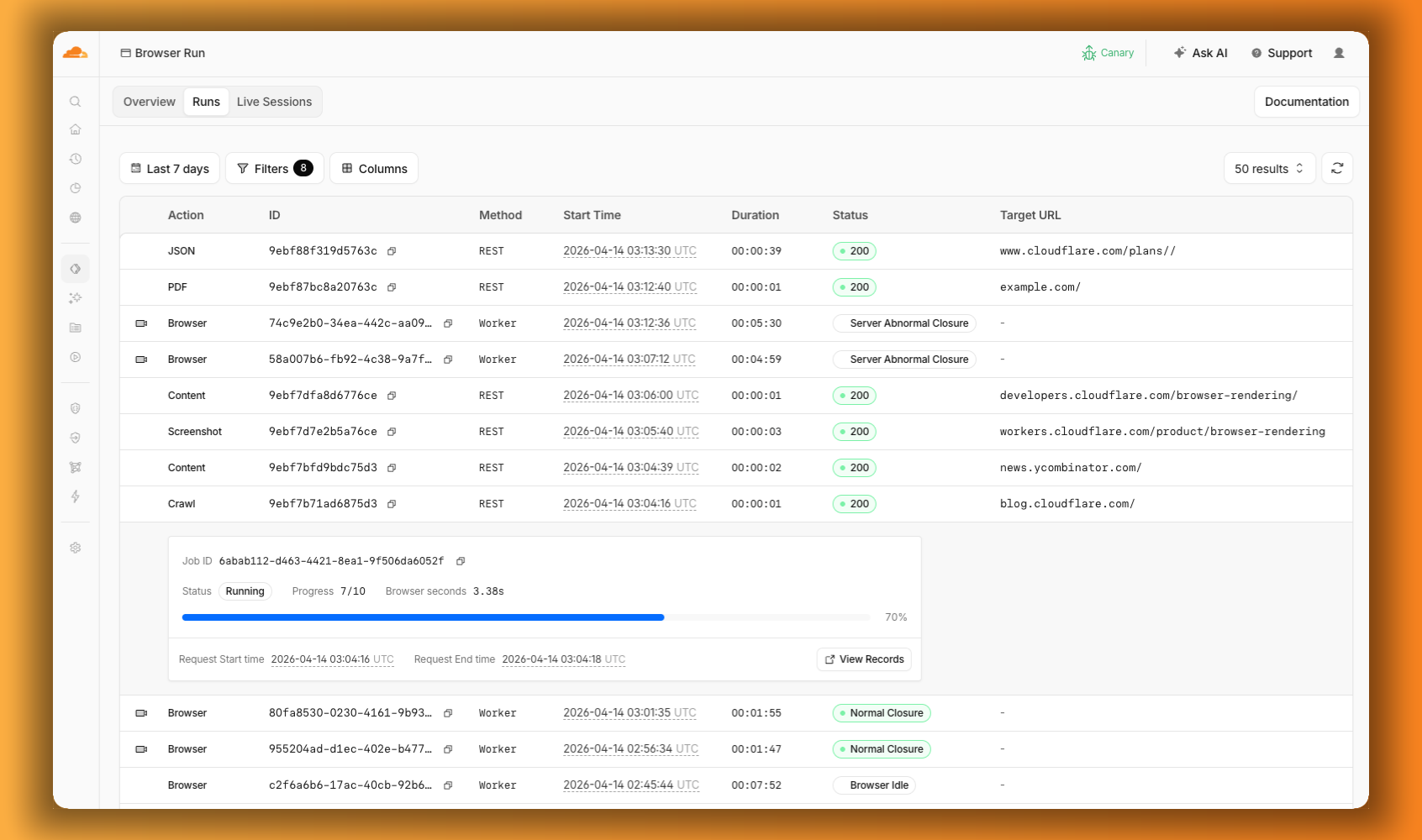
The redesigned dashboard now shows every request in a single Runs tab, not just browser sessions but also quick actions like screenshots, PDFs, markdown, and crawls. Filter by endpoint, view target URLs, status, and duration, and expand any row for more detail.

Browser Run dashboard Runs tab with browser sessions and quick actions visible in one list, and an expanded crawl job showing its progress

We are also shipping several new features:

  • Live View, Human in the Loop, and Session Recordings - See what your agent is doing in real time, let humans step in when automation hits a wall, and replay any session after it ends.
  • WebMCP - Websites can expose structured tools for AI agents to discover and call directly, replacing slow screenshot-analyze-click loops.

For the full story, read our Agents Week blog Browser Run: Give your agents a browser.

Browser Run adds Live View, Human in the Loop, and Session Recordings

When browser automation fails or behaves unexpectedly, it can be hard to understand what happened. We are shipping three new features in Browser Run (formerly Browser Rendering) to help:

Live View

Live View lets you see what your agent is doing in real time. The page, DOM, console, and network requests are all visible for any active browser session. Access Live View from the Cloudflare dashboard, via the hosted UI at live.browser.run, or using native Chrome DevTools.

Human in the Loop

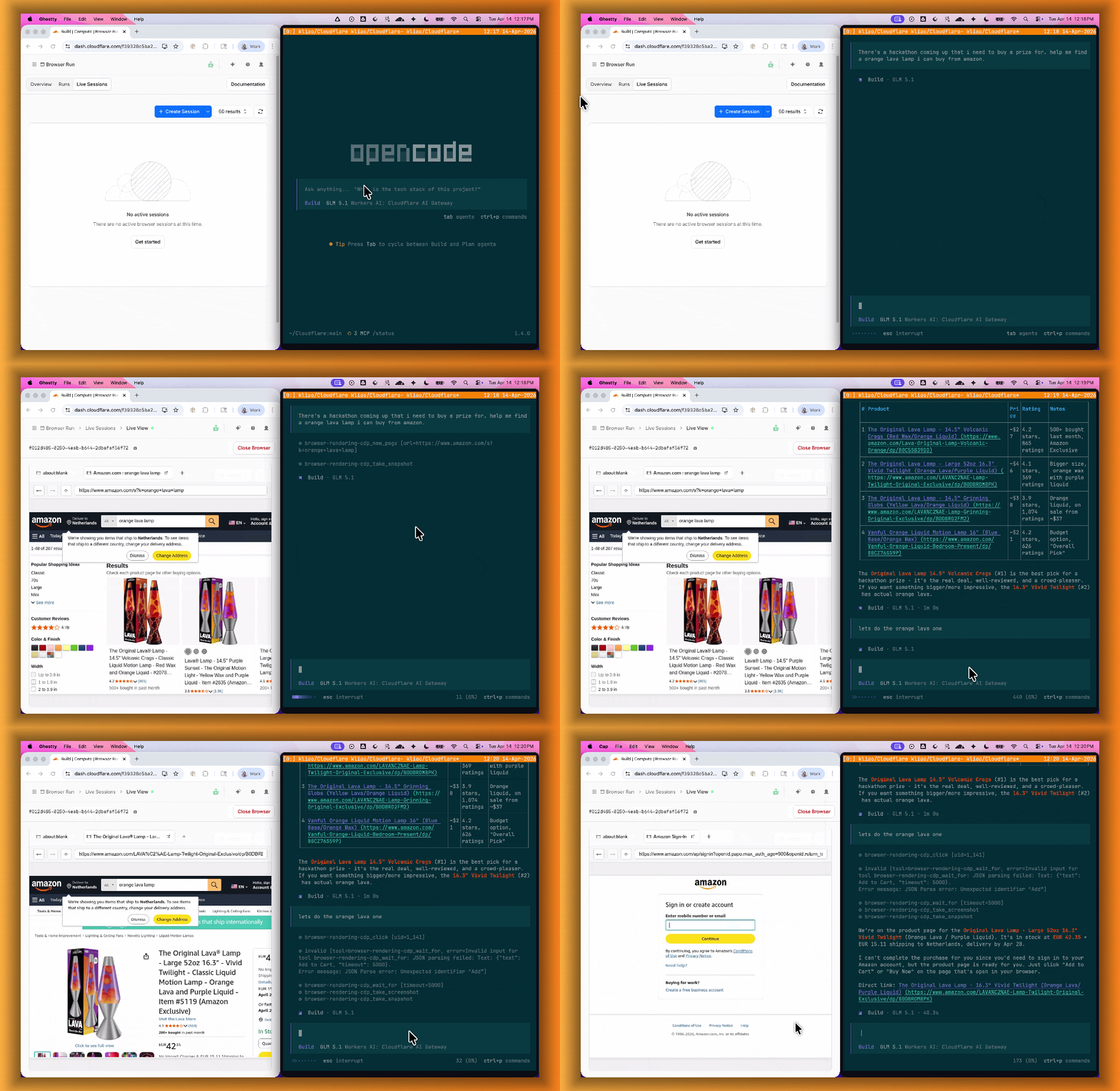
When your agent hits a snag like a login page or unexpected edge case, it can hand off to a human instead of failing. With Human in the Loop, a human steps into the live browser session through Live View, resolves the issue, and hands control back to the script.

Today, you can step in by opening the Live View URL for any active session. Next, we are adding a handoff flow where the agent can signal that it needs help, notify a human to step in, then hand control back to the agent once the issue is resolved.

Browser Run Human in the Loop demo where an AI agent searches Amazon, selects a product, and requests human help when authentication is needed to buy

Session Recordings

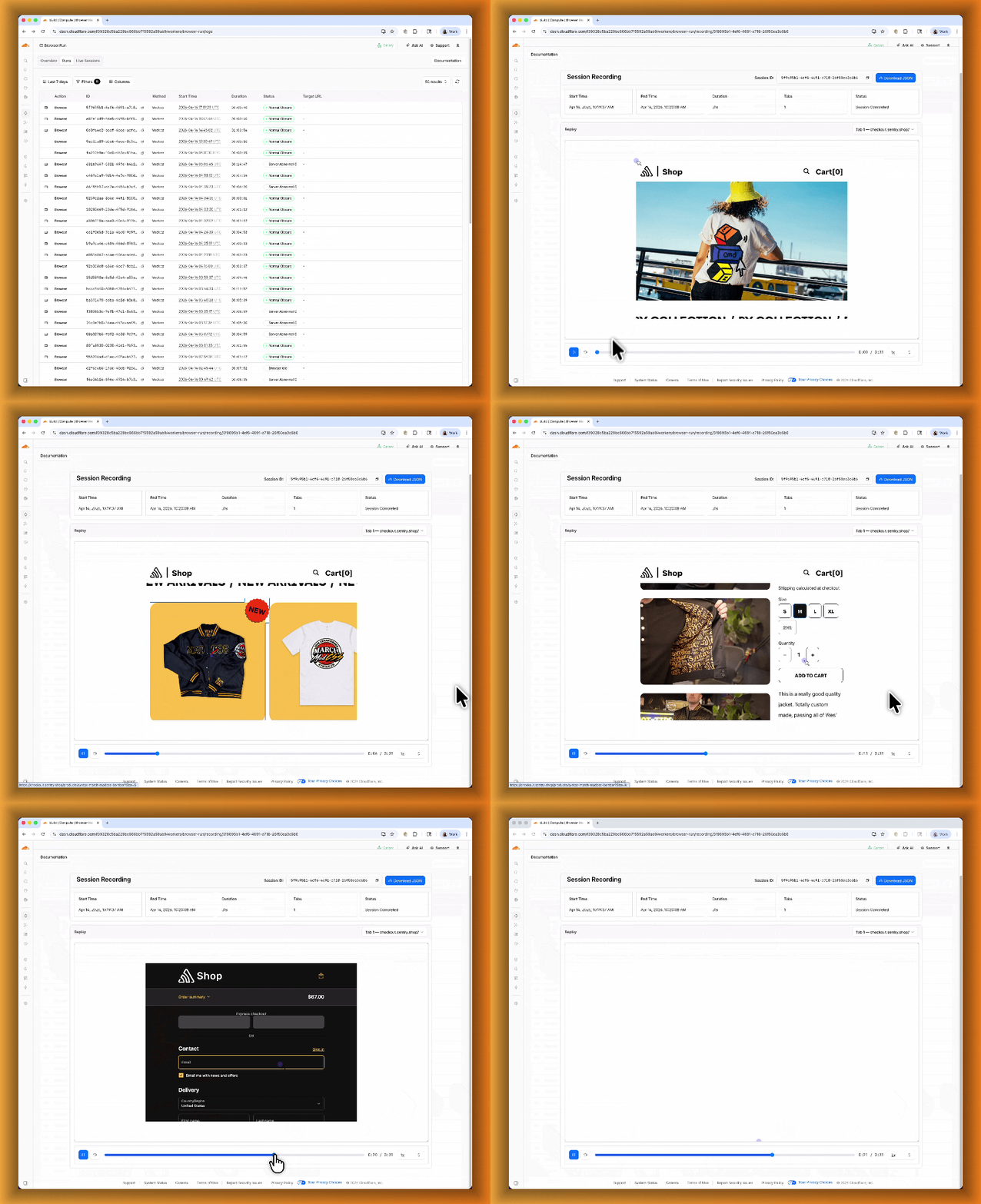
Session Recordings records DOM state so you can replay any session after it ends. Enable recordings by passing recording: true when launching a browser. After the session closes, view the recording in the Cloudflare dashboard under Browser Run > Runs, or retrieve via API using the session ID. Next, we are adding the ability to inspect DOM state and console output at any point during the recording.

Browser Run session recording showing an automated browser navigating the Sentry Shop and adding a bomber jacket to the cart

To get started, refer to the documentation for Live View, Human in the Loop, and Session Recording.

Browser Run adds WebMCP support

Browser Run (formerly Browser Rendering) now supports WebMCP (Web Model Context Protocol), a new browser API from the Google Chrome team.

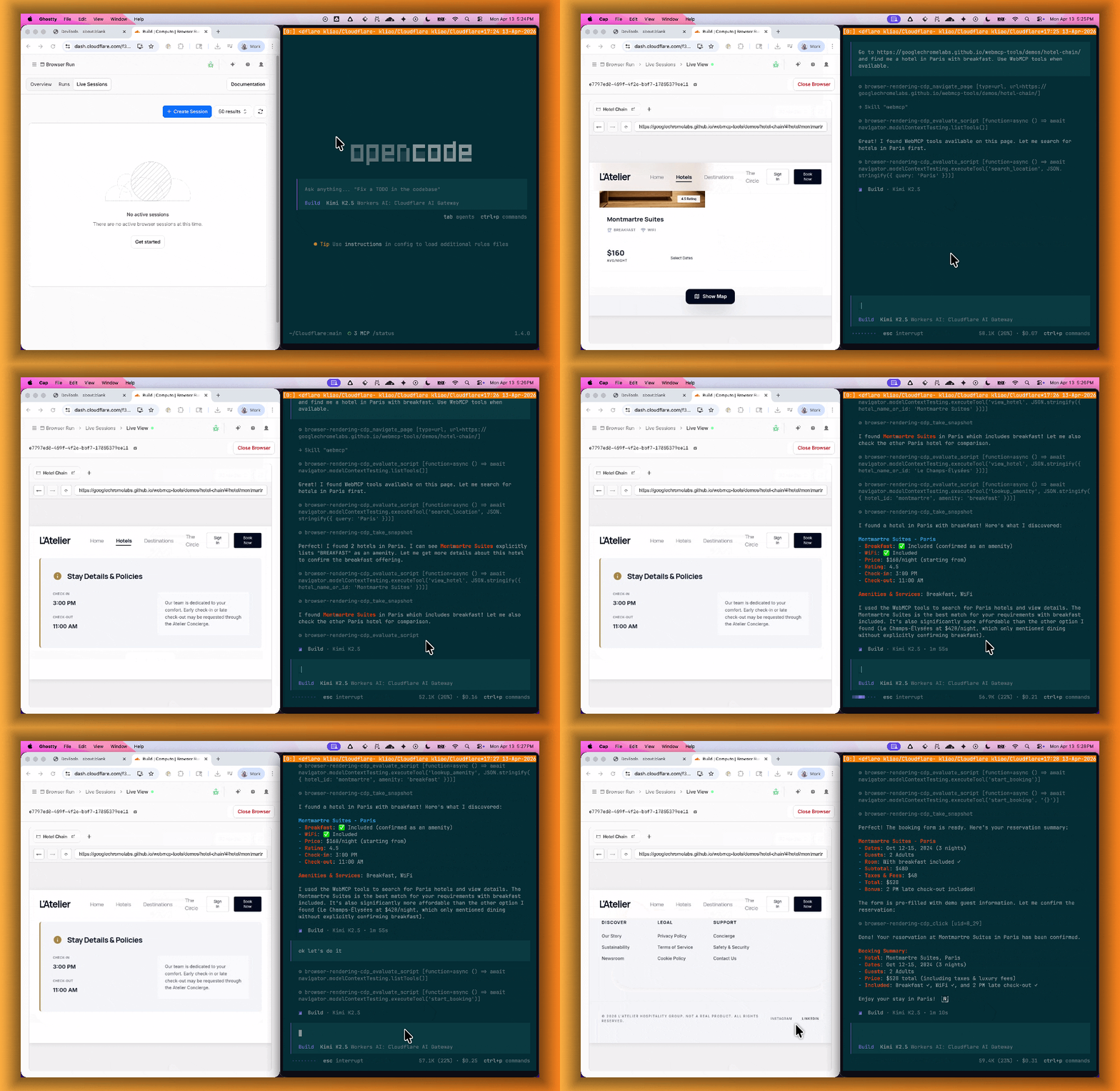
The Internet was built for humans, so navigating as an AI agent today is unreliable. WebMCP lets websites expose structured tools for AI agents to discover and call directly. Instead of slow screenshot-analyze-click loops, agents can call website functions like searchFlights() or bookTicket() with typed parameters, making browser automation faster, more reliable, and less fragile.

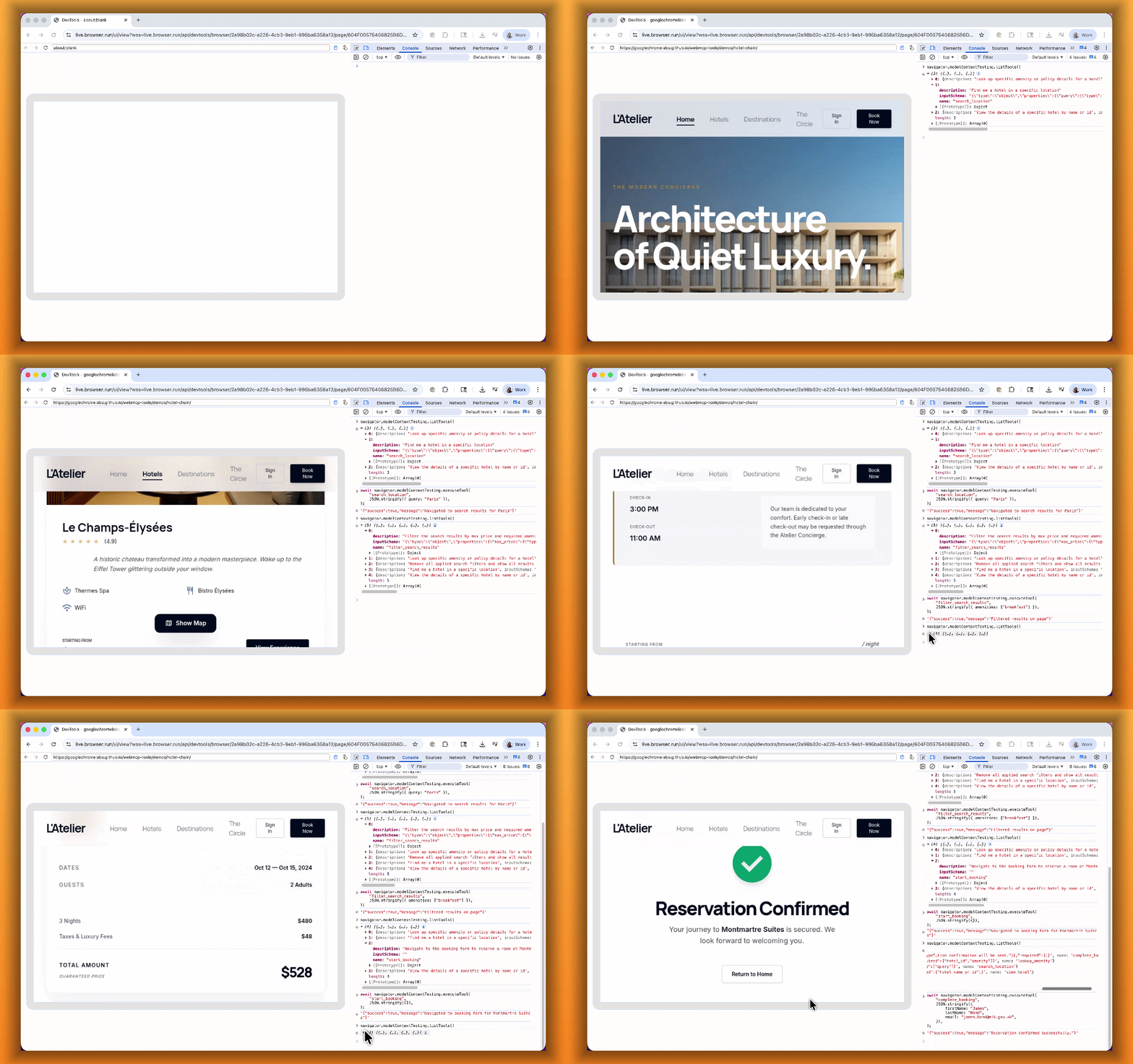
Browser Run lab session showing WebMCP tools being discovered and executed in the Chrome DevTools console to book a hotel

With WebMCP, you can:

  • Discover website tools - Use navigator.modelContextTesting.listTools() to see available actions on any WebMCP-enabled site
  • Execute tools directly - Call navigator.modelContextTesting.executeTool() with typed parameters
  • Handle human-in-the-loop interactions - Some tools pause for user confirmation before completing sensitive actions

WebMCP requires Chrome beta features. We have an experimental pool with browser instances running Chrome beta so you can test emerging browser features before they reach stable Chrome. To start a WebMCP session, add lab=true to your /devtools/browser request:

curl -X POST "https://api.cloudflare.com/client/v4/accounts/{account_id}/browser-rendering/devtools/browser?lab=true&keep_alive=300000" \
  -H "Authorization: Bearer {api_token}"

Combined with the recently launched CDP endpoint, AI agents can also use WebMCP. Connect an MCP client to Browser Run via CDP, and your agent can discover and call website tools directly. Here's the same hotel booking demo, this time driven by an AI agent through OpenCode:

Browser Run Live View showing an AI agent navigating a hotel booking site in real time

For a step-by-step guide, refer to the WebMCP documentation.

Agent Lee adds Write Operations and Generative UI

Agent Lee adds Write Operations and Generative UI

We are excited to announce two major capability upgrades for Agent Lee, the AI co-pilot built directly into the Cloudflare dashboard. Agent Lee is designed to understand your specific account configuration, and with this release, it moves from a passive advisor to an active assistant that can help you manage your infrastructure and visualize your data through natural language.

Take action with Write Operations

Agent Lee can now perform changes on your behalf across your Cloudflare account. Whether you need to update DNS records, modify SSL/TLS settings, or configure Workers routes, you can simply ask.

To ensure security and accuracy, every write operation requires explicit user approval. Before any change is committed, Agent Lee will present a summary of the proposed action in plain language. No action is taken until you select Confirm, and this approval requirement is enforced at the infrastructure level to prevent unauthorized changes.

Example requests:

  • "Add an A record for blog.example.com pointing to 192.0.2.10."
  • "Enable Always Use HTTPS on my zone."
  • "Set the SSL mode for example.com to Full (strict)."

Visualize data with Generative UI

Understanding your traffic and security trends is now as easy as asking a question. Agent Lee now features Generative UI, allowing it to render inline charts and structured data visualizations directly within the chat interface using your actual account telemetry.

Example requests:

  • "Show me a chart of my traffic over the last 7 days."
  • "What does my error rate look like for the past 24 hours?"
  • "Graph my cache hit rate for example.com this week."

Availability

These features are currently available in Beta for all users on the Free plan. To get started, log in to the Cloudflare dashboard and select Ask AI in the upper right corner.

To learn more about how to interact with your account using AI, refer to the Agent Lee documentation.