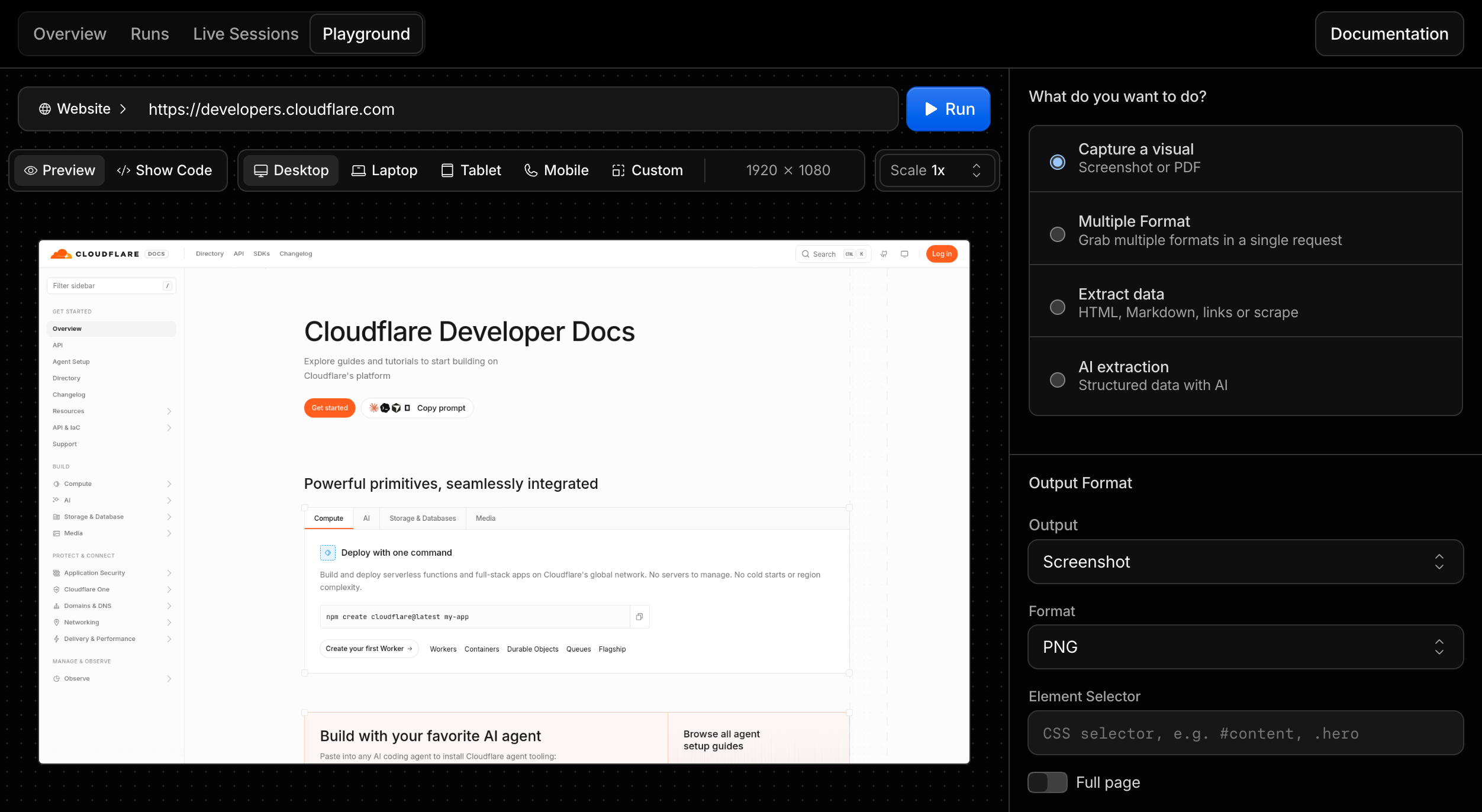
Browser Run now includes a Playground in the Cloudflare dashboard. Use it to try Quick Actions against a live browser without creating a Worker, installing an SDK, or deploying code first.
The Playground helps you test a target URL or raw HTML input, tune viewport and page-load settings, preview the output, and copy working code for the same request.
You can also configure desktop, laptop, tablet, mobile, or custom viewport sizes, set browser scale, choose page-load conditions, set timeouts, and wait for selectors before running a request.
Select Show Code to generate the same request as cURL, TypeScript SDK, Python, or Workers Binding code. For example, a screenshot request can be copied as a Workers Binding call:
You can now rotate the broadcast credentials for a Stream live input without changing the live input identifier.
Use key rotation when live input credentials may have been shared with the wrong audience, exposed in client code or a screenshare, or need to be refreshed as part of your security process. Rotating keys revokes the old credentials, disconnects broadcasts using stale credentials, and returns refreshed credentials in the API response.
To rotate keys for a live input, make a POST request to the rotate_keys endpoint:
curl --request POST \https://api.cloudflare.com/client/v4/accounts/{account_id}/stream/live_inputs/{live_input_identifier}/rotate_keys \--header "Authorization: Bearer <API_TOKEN>"
Live input responses now also include keysRotatedAt, which indicates when the live input keys were last rotated. This field is omitted for live inputs whose keys have never been rotated.
wrangler check startup now reports your Worker's raw and compressed bundle sizes. It also summarizes local CPU activity during startup directly in your terminal.
Large bundles and costly startup work can introduce cold-start latency, so use this command to find code and large dependencies that slow your Worker before it handles requests.
The summary includes sampled, active, garbage collection, and idle time. Wrangler continues to save a .cpuprofile file for detailed flamegraph analysis in Chrome DevTools or VS Code.
⛅️ wrangler 4.116.0───────────────────────────────────────────────├ Building your Worker│ Worker Built! 🎉│├ Analysing│ Startup phase analysed││ Bundle: 7171.25 KiB / gzip: 2197.00 KiB││ Local startup profile:│ Profile window: 70.3 ms│ Sampled time: 70.3 ms│ Active: 38.5 ms (including 3.7 ms garbage collection)│ Idle: 31.8 ms│ Samples: 36││ CPU Profile has been written to worker-startup.cpuprofile. Load it into the Chrome DevTools profiler (or directly in VSCode) to view a flamegraph.││ Note that the CPU Profile was measured on your Worker running locally on your machine, which has a different CPU than when your Worker runs on Cloudflare.││ As such, CPU Profile can be used to understand where time is spent at startup, but the overall startup time in the profile should not be expected to exactly match what your Worker's startup time will be when deploying to Cloudflare.
The profile runs locally, so its duration will differ from startup time on Cloudflare. For authoritative startup time, deploy your Worker or upload a version.
Available in Wrangler version 4.116.0 or later. For more information, refer to wrangler check startup.
You can now use AI Search directly from popular agent frameworks, adding grounded retrieval to an existing app instead of calling the REST API by hand. The new Agents section has guides for the Vercel AI SDK, LangChain, and the Cloudflare Agents SDK. The AI SDK integration is a new package, and the LangChain integration is a new retriever in the existing langchain-cloudflare package.
Vercel AI SDK
The ai-search-provider ↗ package connects AI Search to the AI SDK, and targets AI SDK v6 (ai@^6). Pass instance.chat() to generateText or streamText to generate a response grounded in your indexed content, with the retrieved chunks returned as sources. You can also expose instance.search() as a tool for agent loops.
The langchain-cloudflare package (PyPI ↗, GitHub ↗) provides CloudflareAISearchRetriever, a standard LangChain retriever backed by AI Search. Use it on its own, wrap it with create_retriever_tool to give an agent a search tool, or drop it into a RAG chain. It works with REST credentials or a Worker binding inside a Python Worker.
from langchain_cloudflare import CloudflareAISearchRetrieverretriever = CloudflareAISearchRetriever( account_id=ACCOUNT_ID, api_token=API_TOKEN, instance_name="knowledge-base", retrieval_type="hybrid",)docs = retriever.invoke("How do I configure Workers AI?")
Cloudflare Agents SDK
The Cloudflare Agents SDK could already reach AI Search through the Workers binding. The new guide walks through building a stateful chat agent that provisions its own instance, indexes content, and searches it from a tool.
import { tool } from "ai";import { z } from "zod";const instance = env.AI_SEARCH.get("knowledge-base");// Expose AI Search to the agent's model as a tool it can call.const searchKnowledgeBase = tool({ description: "Search the knowledge base for relevant content.", inputSchema: z.object({ query: z.string() }), execute: ({ query }) => instance.search({ query }),});
import { tool } from "ai";import { z } from "zod";const instance = env.AI_SEARCH.get("knowledge-base");// Expose AI Search to the agent's model as a tool it can call.const searchKnowledgeBase = tool({ description: "Search the knowledge base for relevant content.", inputSchema: z.object({ query: z.string() }), execute: ({ query }) => instance.search({ query }),});
For the full walkthroughs, including creating an instance and indexing content, refer to the Agents guides.
Workers Builds now uses Node.js 24.18.0 by default. The build image preinstalls Node.js 22.23.2 and 24.18.0.
You can continue to override the default with the NODE_VERSION environment variable, an .nvmrc file, or a .node-version file. For more information, refer to Override default versions.
Cloudflare's product-specific MCP servers now support the new MCP 2026-07-28 Specification. Each request runs on a fresh stateless server without an MCP protocol session or protocol-specific Durable Object.
The /mcp endpoint also accepts stateless requests from 2025 Streamable HTTP clients. Most clients can reconnect without configuration changes.
Use /mcp for new connections. Historical /sse URLs continue to work as aliases for the same Streamable HTTP handler, but they no longer serve the deprecated HTTP+SSE transport. If a client forces SSE transport, change it to Streamable HTTP or automatic transport detection.
Browser Run now supports structured handoff for Human in the Loop workflows. Using Cloudflare-specific CDP commands, your agent can signal that it needs help, a human steps in through Live View to handle the task, and the agent resumes once the work is done.
For agents running multi-step browser workflows, a single login wall or unexpected prompt can fail the entire run. Previously, scripts had to manage human intervention manually by sharing a Live View URL and polling for completion. Structured handoff replaces this with a formal pause-and-resume flow.
The following example requests human intervention for a login page and waits for the human to finish before continuing:
const cdp = await page.createCDPSession();// Get Live View URL for the human operatorconst { devtoolsFrontendUrl } = await cdp.send("Cloudflare.getLiveView", { mode: "tab",});console.log(`Human input needed: ${devtoolsFrontendUrl}`);// Request human intervention and wait for completionconst handoffComplete = new Promise((resolve) => { cdp.once("Cloudflare.handoffComplete", resolve);});await cdp.send("Cloudflare.handoff", { instructions: "Please log in with your credentials", timeout: 600000,});const result = await handoffComplete;console.log(result.success ? "Handoff complete" : `Failed: ${result.reason}`);
We are limiting Workers Free plan access to a few resource-intensive models so we can prioritize capacity for the broader Workers AI user base. This helps everyone get a more reliable inference experience, with fewer 429 and 3040 (Out of Capacity) errors.
On the Workers Free plan, requests to these models now return a 403 HTTP error (internal error 5035) prompting you to upgrade. The Workers Paid plan starts at $5 per month and still includes the 10,000 free Neurons per day allocation, with usage beyond that billed at each model's pricing.
Many models remain available on the Workers Free plan, including:
The Workers runtime now provides built-in tracing.startActiveSpan() and span.end() APIs, allowing you to write custom spans for operations that last beyond a single callback — for example, instrumenting a stream pipeline where the span should stay open until the stream is fully consumed.
This augments the existing API for writing custom spans, tracing.enterSpan(), which automatically ends a span when its callback is returned. With startActiveSpan(), the span remains open after the callback returns, and you call span.end() when the work is complete:
src/index.jsjs
import { tracing } from "cloudflare:workers";const encoder = new TextEncoder();export default { fetch() { return tracing.startActiveSpan("stream-response", (span) => { let timer; const body = new ReadableStream({ start(controller) { controller.enqueue(encoder.encode("Starting...\n")); timer = setTimeout(() => { controller.enqueue(encoder.encode("Complete.\n")); controller.close(); span.setAttribute("stream.status", "complete"); span.end(); }, 1000); }, cancel() { if (timer !== undefined) clearTimeout(timer); span.setAttribute("stream.status", "cancelled"); span.end(); }, }); return new Response(body, { headers: { "content-type": "text/plain" }, }); }); },};
Agents SDK v0.20.0 adds client and server support for the MCP 2026-07-28 release candidate ↗. Workers can serve tools, prompts, resources, and elicitation without an MCP transport session or Durable Object. Agents can connect to both MCP 2026-07-28 servers and existing legacy servers.
Client support
The MCP client manager now uses @modelcontextprotocol/client. For each connection, it probes for MCP 2026-07-28 support with server/discover. If the server does not support the stateless protocol, the client continues with the legacy initialize handshake on the same connection. Existing addMcpServer calls do not need a protocol-version setting or separate clients for each protocol generation.
For stateless requests, elicitation uses input_required through multi-round-trip requests (MRTR). The legacy path uses the same form and URL handlers for pushed requests. The SDK collects input, retries the original operation, and resolves the original callTool, getPrompt, or readResource promise with its final result.
OAuth callbacks now validate issuer metadata through the v2 SDK. Discovery state and issuer-bound credentials persist across browser redirects and Durable Object hibernation.
Run stateless servers
createMcpHandler now accepts a factory that returns a server from @modelcontextprotocol/server. The factory creates an isolated server for each request.
The isolated agents/mcp/server entry keeps McpAgent, WorkerTransport, MCP client transports, and SDK v1 modules out of stateless server bundles.
The Workers wrapper validates present browser Origins, supports explicit delegation to trusted Origin middleware, and exposes request handling plus typed change notifications.
Backward compatibility
The same createMcpHandler(createServer)(request, env, ctx) route serves MCP 2026-07-28 clients and legacy clients that use stateless requests. You do not need separate routes or tool definitions for ordinary tools, prompts, and resources.
McpAgent is deprecated and feature-frozen. Migrate existing McpAgent servers to the stateless handler at your earliest convenience. If a server depends on protocol sessions, RPC, pushed server-to-client requests, standalone streams, or replay, use the migration guide to design stateless equivalents and run both routes while clients transition.
Migrate existing SDK v1 servers
Upgrade the Agents SDK:
npm i agents@latest
yarn add agents@latest
pnpm add agents@latest
bun add agents@latest
Move ordinary SDK v1 server definitions into an SDK v2 factory and serve them with createMcpHandler. The handler's default legacy compatibility means most stateless deployments need only one route.
If an existing McpAgent server still needs sessionful features, add the stateless path beside it. Use isLegacyRequest() to send only legacy traffic to the existing route:
Migrate the remaining sessionful features, allow existing sessions to drain, then remove the legacy route. Refer to Migrate to MCP SDK v2 for package changes, compatibility limits, and rollout steps.
Deprecations in v0.20.0
This release deprecates the following Agents SDK APIs:
Deprecated API
Replacement
Status
McpAgent
Use an SDK v2 factory with createMcpHandler for stateless servers. Use the migration guide to replace stateful features before removing a legacy route.
Feature-frozen. No removal version is announced.
createMcpHandler(v1Server, options)
Move the server to an SDK v2 factory and call createMcpHandler(factory, options). Use createLegacyMcpHandler only as a temporary bridge for sessionful features.
Scheduled for removal in the next major version.
MCPClientManager.callTool(params, resultSchema, options) and the equivalent withX402Client overload
Use callTool(params, options) or callTool(confirm, params, options).
Compatibility overload. No removal version is announced.
The MCP 2026-07-28 draft separately deprecates Roots, Sampling, Logging, the old HTTP+SSE transport, and Dynamic Client Registration.
Wrangler now provides createTestHarness(), an API for running integration tests against Workers built with Wrangler or the Cloudflare Vite plugin from any Node.js test runner.
Sippy can now incrementally migrate data from Azure Blob Storage and any S3-compatible object storage provider to Cloudflare R2, in addition to Amazon S3 and Google Cloud Storage. Sippy copies objects to R2 as your application requests them, so you can start serving data from R2 without first moving your entire dataset or paying migration-specific egress fees.
Enable Sippy
Run the following command and follow the prompts to select and configure your source storage provider:
npx wrangler r2 bucket sippy enable <BUCKET_NAME>
For Azure Blob Storage, provide your storage account name, container name, and either an account key or a shared access signature (SAS) token with read and list permissions. For an S3-compatible provider, provide the S3 API endpoint URL and read-only Access Key ID and Secret Access Key.
After you enable Sippy, requests for objects that are not yet in R2 are served from your source bucket and copied to R2. Subsequent requests for those objects are served from R2.
For setup instructions and credential requirements, refer to the Sippy documentation.
The agents, @cloudflare/ai-chat, @cloudflare/codemode, and @cloudflare/think packages now support AI SDK v6 and v7. Existing applications can remain on v6 when updating these packages. Applications can also adopt v7 without changing the Cloudflare Agents APIs they use.
The supported peer ranges are ai@^6 || ^7 and @ai-sdk/react@^3 || ^4. Use matching major versions: pair AI SDK v6 with @ai-sdk/react v3, or pair AI SDK v7 with @ai-sdk/react v4.
To install the latest packages with AI SDK v7:
npm i agents@latest @cloudflare/ai-chat@latest @cloudflare/codemode@latest @cloudflare/think@latest ai@^7 @ai-sdk/react@^4
bun add agents@latest @cloudflare/ai-chat@latest @cloudflare/codemode@latest @cloudflare/think@latest ai@^7 @ai-sdk/react@^4
Think normalizes streaming, tool completion events, and telemetry across both AI SDK versions. Existing v6 applications do not need to migrate these integrations before updating Think.
This release reduces repeated MCP schema conversion and adds an opt-out for Think's automatic MCP tool exposure. It also lets non-AI-SDK hosts invoke the durable Code Mode runtime directly.
Control direct MCP tool exposure in Think
Agents SDK MCP clients now reuse converted input and output schemas while a live connection keeps the same tool catalog. This avoids converting every MCP JSON Schema to Zod again for each model turn.
@cloudflare/think also adds includeMcpTools. Set it to false when you expose MCP tools through Code Mode or another mechanism outside Think's automatic tool set:
import { Think } from "@cloudflare/think";export class MyAgent extends Think { includeMcpTools = false; waitForMcpConnections = true;}
import { Think } from "@cloudflare/think";export class MyAgent extends Think<Env> { includeMcpTools = false; waitForMcpConnections = true;}
This setting skips Think's automatic getAITools() call. MCP registration, restoration, discovery, raw catalog access, direct calls, and Code Mode connectors continue to work.
@cloudflare/codemode@latest adds execute(), search(), and describe() to the durable runtime handle. MCP servers and other hosts can now execute code and discover connector methods without adapting the runtime to an AI SDK tool.
Search and describe results include requiresApproval: true for protected connector methods. Resolve a paused execution with the existing approve() and reject() methods.
Devin Outposts ↗ lets you run Devin agents on Cloudflare. Each Devin session runs in its own isolated sandbox backed by Cloudflare Containers, so agents can execute code and use development tooling in an isolated environment.
Use Devin Outposts when you want Devin sessions to run on Cloudflare managed infrastructure, with each session isolated from the others.
We are turning on budget alerts by default for eligible Pay-as-you-go accounts. If your account does not already have a budget alert, Cloudflare will create one for you with a $10 account-level threshold. Your default alert will enable at the turn of your next billing cycle, so it will not fire based on usage you have already incurred.
We are rolling this out in cohorts over the coming weeks, so eligible accounts may see their default alert appear at different times.
The default alert behaves exactly like an alert you would create yourself. When your cumulative usage-based spend this cycle reaches the threshold, you receive an email notification. The alert is informational only. It does not cap your usage or impact your account in any way.
Usage is processed once per day for the prior day's activity, so budget alerts fire the day after the threshold is reached rather than in real time.
Budget alerts only consider spend on usage-based products. Recurring subscription fees, such as the Workers Paid plan fee or other monthly plan charges, are not included in the threshold calculation.
You can change the threshold, add additional alerts, or remove the default alert entirely from Manage Account > Billing > Billable Usage, or from your Notifications settings. If you already configured your own budget alert, nothing changes.
You can now monitor the total SQLite storage used by a Durable Object namespace over time in the Cloudflare dashboard. The new Total storage chart shows the maximum storage reported during each hour. This helps you identify storage growth, validate data cleanup, and investigate unexpected usage.
The chart appears only for SQLite-backed Durable Object namespaces. It does not appear for namespaces that use the legacy key-value storage backend. Viewing storage for individual Durable Objects by ID or name is not supported.
You can now preview the content of sent emails directly from the Email Service Activity log. Expand a sent email and open the new Preview section to inspect the message as it was sent, across tabs for the rendered HTML body, the Text body, the Headers, the Attachments, and the full RawRFC 5322 ↗ source.
Previously, the Activity log surfaced delivery and authentication metadata but not the message content, making rendering and content issues harder to debug. Message preview closes that gap.
To make messages previewable, turn on Email preview in your sending domain's settings. Previews cover messages sent while the setting is turned on and are retained for about seven days. Sending domains onboarded on or after 2026-07-02 have Email preview turned on automatically.
After a flag exists, change its default variation or use enable and disable commands as kill switches. Existing targeting rules continue to apply unless you change or clear them explicitly:
These commands can also be used from CI/CD pipelines, scripts, and AI agents to inspect Flagship state, update flag behavior, or roll back changes through Wrangler.
You can now subscribe to Email Sending events through Queues event subscriptions and receive outbound transactional email lifecycle events on a queue. Each subscription is scoped to one sending domain — either the zone apex, such as example.com, or a verified sending subdomain, such as send.example.com.
Six event types are published: message.delivered, message.deferred, message.bounced, message.failed, message.rejected, and message.complained. Use them to track deliverability, react to bounces and complaints, and drive suppression or retry logic. Email Routing events are not published on this source.
Each event includes the message details, delivery status, and SMTP response:
The legacy Workers KV API routes under /accounts/{account_id}/workers/namespaces/* are deprecated as of July 15, 2026, and will stop working on October 15, 2026. Migrate to the documented Workers KV API routes under /accounts/{account_id}/storage/kv/namespaces/* before that date.
The legacy and replacement routes are interchangeable. They accept the same request parameters and return the same response payloads. To migrate, update the URL path from /workers/namespaces/ to /storage/kv/namespaces/.
What you need to do
Update any integration that calls a route under /accounts/{account_id}/workers/namespaces/ to use the equivalent route under /accounts/{account_id}/storage/kv/namespaces/. The migration is a direct URL path substitution — request parameters and response payloads are identical:
GET and POST /accounts/{account_id}/workers/namespaces → GET and POST /accounts/{account_id}/storage/kv/namespaces
GET, PUT, and DELETE /accounts/{account_id}/workers/namespaces/{namespace_id} → GET, PUT, and DELETE /accounts/{account_id}/storage/kv/namespaces/{namespace_id}
GET /accounts/{account_id}/workers/namespaces/{namespace_id}/keys → GET /accounts/{account_id}/storage/kv/namespaces/{namespace_id}/keys
GET /accounts/{account_id}/workers/namespaces/{namespace_id}/metadata/{key_name} → GET /accounts/{account_id}/storage/kv/namespaces/{namespace_id}/metadata/{key_name}
GET, PUT, and DELETE /accounts/{account_id}/workers/namespaces/{namespace_id}/values/{key_name} → GET, PUT, and DELETE /accounts/{account_id}/storage/kv/namespaces/{namespace_id}/values/{key_name}
For more information about the deprecation timeline, refer to API deprecations.
Cloudflare Web Analytics (Real User Monitoring) has rolled out performance optimizations to significantly improve the stability and loading speed of account-wide dashboards.
For larger accounts (with >100 Web Analytics sites), loading the aggregate account-wide view would often fail, running into timeouts or unexpected interface errors due to the massive scale of parallel query processing. This update optimizes how high-volume multi-site data is queried to reduce errors and provide a snappier dashboard experience.
Accounts with up to 1,000 sites will now be able to load this account-wide aggregate view without experiencing misleading errors.
If you have an account with over 1,000 sites, we cannot currently aggregate over this volume due to processing constraints but you will now be presented with a clear error and instruction to filter to the relevant site(s) you wish to see the data for.
Platforms can now create temporary preview accounts through the Cloudflare REST API. This lets your platform deploy a live Worker before the user signs in to Cloudflare.
With the Temporary Accounts API, coding agents, AI app builders, and other platforms can build a similar flow for generated Workers and supported resources.
Your platform can keep users in its onboarding flow while they generate, deploy, and test an application. Users do not need an existing Cloudflare account, and your platform does not need write access to one.
The API returns a claim URL that lets the user make the temporary account and its resources permanent.
Cloudflare Drop ↗ demonstrates this preview-and-claim pattern for static sites. Someone can upload a site, test and share it for one hour, then sign in or create an account only when they want to keep it.
This API expands the flow first introduced with wrangler deploy --temporary. Your backend now controls the provisioning and deployment experience directly:
Show Cloudflare's Terms of Service and Privacy Policy in your product, and require the user to accept them.
Request and solve a proof-of-work challenge.
Create a temporary preview account.
Deploy with the returned temporary account ID and API token.
Show the deployed Worker URL and claim URL to the user.
Agents connected to Model Context Protocol (MCP) servers with addMcpServer can now handle elicitation ↗ requests.
Elicitation lets an MCP server request user input while it handles a tool call. Form mode collects structured, non-sensitive data. URL mode asks for consent before opening an out-of-band flow, such as third-party authorization or payment.
sequenceDiagram
    participant User
    participant Agent as Agent (MCP client)
    participant Server as MCP server
    participant Browser

    Server->>Agent: elicitation/create
    Agent->>User: Show server, reason, and input or URL
    User->>Agent: Submit, open, decline, or cancel
    Agent->>Browser: Open URL after consent (URL mode)
    Agent->>Server: accept, decline, or cancel
    Server-->>Agent: Optional URL completion notification
Register a handler for each mode your Agent supports in onStart():
import { Agent } from "agents";export class MyAgent extends Agent { onStart() { this.mcp.configureElicitationHandlers({ form: (request, serverId) => this.forwardToUser(request, serverId), url: (request, serverId) => this.forwardToUser(request, serverId), }); } forwardToUser(request, serverId) { // Show the request in your UI and resolve after the user responds. throw new Error( `Implement elicitation for ${serverId}: ${request.params.message}`, ); }}
import { Agent } from "agents";import type { ElicitRequest, ElicitResult } from "agents/mcp";export class MyAgent extends Agent<Env> { onStart() { this.mcp.configureElicitationHandlers({ form: (request, serverId) => this.forwardToUser(request, serverId), url: (request, serverId) => this.forwardToUser(request, serverId), }); } private forwardToUser( request: ElicitRequest, serverId: string, ): Promise<ElicitResult> { // Show the request in your UI and resolve after the user responds. throw new Error( `Implement elicitation for ${serverId}: ${request.params.message}`, ); }}
Connections advertise only the modes with configured handlers. An Agent without handlers advertises no elicitation capability, which lets the server use its fallback. The SDK stores the advertised modes with each MCP server registration so they survive Durable Object hibernation. Callback functions remain in memory and reattach when onStart() runs.