Certificate Transparency Monitoring is now generally available ↗ across all Cloudflare plans.
Alerts for certificates Cloudflare issues on your behalf (Universal SSL renewals, backup certificates, Advanced Certificate Manager, Total TLS) are now automatically filtered out. Alert emails are also clearer and more actionable, with structured certificate details and a direct link to manage CT Monitoring in the Cloudflare dashboard.
Hostname routing ↗ is now generally available. Instead of managing static IP lists and routes, you can route traffic by hostname across multiple Cloudflare One connectors:
Cloudflare Tunnel: route a private hostname (for example, wiki.internal.local) to a private application behind your tunnel, or a public hostname (for example, bank.example.com) to egress through a specific tunnel and anchor traffic to a dedicated exit node.
Alongside GA, the default IPv4 range used for initial resolved IPs (also called token IPs) is changing from a Carrier-Grade NAT (CGNAT) range to a public Cloudflare-owned range:
Why this is changing: Starting with Chrome 142 ↗, Local Network Access (LNA) restrictions block background requests to CGNAT addresses (100.64.0.0/10), which included the previous initial resolved IP default (100.80.0.0/16). LNA is implemented at the Chromium engine level, so it affects all Chromium-based browsers (for example, Microsoft Edge, Brave, and Opera), not only Google Chrome. This could silently break hostname-based Gateway features for users of these browsers, and required Chrome Enterprise policy workarounds. The new default range is public Cloudflare address space, so it is not affected by this restriction.
What is affected: Initial resolved IPs are used by several features that associate a DNS query with the network connection that follows it:
Private and public hostname routing for Cloudflare Tunnel
You can check your account's current range, or configure a custom range, at any time from Zero Trust > Team & Resources > Devices > Device profiles, or using the Initial Resolved IP Subnet API.
For full instructions, refer to Configure initial resolved IPs. The IPv6 range (2606:4700:0cf1:4000::/64) is unchanged and is not affected by this restriction.
If you were relying on a Chrome Enterprise policy workaround (such as LocalNetworkAccessRestrictionsTemporaryOptOut) while your account was still on the legacy CGNAT-based range, refer to Google Chrome restricts access to private hostnames for next steps.
This release introduces new protection for a remote code execution vulnerability in vBulletin and improves two existing detections.
Key Findings
A new detection provides protection against vBulletin CVE-2026-61511.
Two existing detections have been improved to strengthen coverage.
Impact
Successful exploitation of CVE-2026-61511 may lead to remote code execution on affected vBulletin systems, potentially resulting in unauthorized access, data exposure, service disruption, and broader compromise of the hosting environment. Administrators are strongly encouraged to apply vendor updates and recommended mitigations.
Real-time Tunnel log streaming is now available in the Cloudflare dashboard under Networking > Tunnels. This brings the same live debugging capability previously only available in the Cloudflare One dashboard, including multi-connector aggregated streaming for high-availability deployments.
In the tunnel detail view, a new Live logs tab lets you:
Stream logs from single or multiple connectors — In highly available deployments with multiple cloudflared replicas, logs from all connectors are merged into a single stream grouped by hostname, making it easy to identify which host machine produced each log entry.
Filter by log level, event type, and HTTP method — Narrow the stream to only the events you care about (HTTP, TCP, UDP, or cloudflared internal), at any log level.
Turnstile Spin is now generally available with three setup paths for creating a Turnstile widget and wiring canonical server-side siteverify into your existing backend. Start in the dashboard, with Wrangler, or from your AI coding agent. All three paths create the same widget. You can complete the integration by hand or have your agent embed the widget, wire siteverify, and validate it.
Server-side verification
Turnstile setup has two parts: embed the widget in your frontend, then call siteverify from your backend. Without the second part, the widget appears on the page but does not protect the request.
The skill includes insertion snippets for Next.js (App Router and Pages Router), Astro, SvelteKit, Hugo, and vanilla HTML. For other frameworks, the agent proposes a generic pattern and asks you to confirm it first.
The Turnstile dashboard flags existing widgets with no matching siteverify traffic. Select Fix with Spin to copy a prompt that guides your agent through wiring siteverify into your backend.
Before finishing, the agent runs a real Turnstile token through your protected endpoint, checks that it passes, then replays the token to confirm the endpoint rejects it on the second try. If a check fails, the agent stops and shows you where.
Run Spin
You can run Spin three ways:
In the Turnstile dashboard, select Set up with Spin, enter your domains, then select Set up. Spin creates the widget and returns the sitekey, secret, and a prompt for your agent.
From the Wrangler CLI, run wrangler turnstile widget create. Wrangler prints the sitekey and secret. You wire the frontend and siteverify by hand.
From your AI coding agent, paste the Spin prompt into Claude Code, Cursor, Codex, OpenCode, or GitHub Copilot Chat. Your agent fetches the skill, creates the widget, then embeds it and wires siteverify.
This release updates WordPress XSS rule metadata in the Cloudflare Managed Ruleset and Cloudflare Free Ruleset to identify XSS2Shell (CVE-2026-64638). It also disables the Command Injection - Obfuscation rule.
Key Findings
CVE-2026-64638: A pre-authentication reflected cross-site scripting vulnerability affecting the WordPress login screen. Exploitation requires social engineering and explicit interaction by the target user. Under additional conditions, it may be escalated to remote code execution.
Impact
The WordPress changes update rule metadata only; detection behavior and actions remain unchanged.
This release introduces new rules and updates Microsoft SharePoint RCE alongside enhanced SSRF cloud protection rule actions.
Key Findings
CVE-2026-50522: An insecure deserialization vulnerability in Microsoft SharePoint Server. This may allow an unauthenticated attacker to execute arbitrary code using crafted requests.
CVE-2026-66066: An improper input processing vulnerability in Ruby on Rails Active Storage image variant transformations. This may allow an unauthenticated attacker to perform arbitrary file reads and achieve Remote Code Execution (RCE) using maliciously crafted payload requests.
This release introduces new rules and updates existing threat signatures to provide targeted protections for vulnerabilities in Nuxt Server Island components and Alibaba Fastjson deserialization routines, alongside enhanced protections for cloud metadata Server-Side Request Forgery (SSRF) and obfuscated command injection attempts.
Key Findings
Nuxt Server Island - RCE(GHSA-9473-5f9j-94wq): An unauthenticated vulnerability in Nuxt Server Islands where remote attackers can supply arbitrary component names or props to endpoints. Manipulating these parameters allows unauthenticated component Remote Code Execution (RCE) on the server.
Alibaba Fastjson JSONType Remote Code Execution: A unauthenticated remote code execution vulnerability in Alibaba Fastjson (≤ 1.2.83) during JSON deserialization. Under default configurations, attackers can execute arbitrary system commands, bypassing traditional classpath and gadget-based defenses.
Generic Protections (SSRF & Command Injection): Added improved detection logic targeting Server-Side Request Forgery (SSRF) in cloud-hosted applications, alongside new rules targeting obfuscated command injection patterns across request parameters.
Ruleset
Rule ID
Legacy Rule ID
Description
Previous Action
New Action
Comments
Cloudflare Managed Ruleset
N/A
SSRF - Cloud - Beta
Log
Block
This is an improved detection.
Cloudflare Managed Ruleset
N/A
Command Injection - Obfuscation
Log
Block
This is a new detection.
Cloudflare Managed Ruleset
N/A
Alibaba Fastjson JSONType Remote Code Execution - Body
Log
Block
This is a new detection.
Cloudflare Managed Ruleset
N/A
Nuxt Server Island - RCE
N/A
Block
This is a new detection.This was labeled as Generic Rules - RCE.
Cloudflare now takes the guesswork out of TLS 1.3 key agreement with your origins. Automatic key exchange predicts the preferred algorithm and sends its key share in the first ClientHello, helping avoid a HelloRetryRequest and one extra network round trip.
Automatic key exchange is on for all existing zones and on by default for new zones. When an origin supports both classical and post-quantum key agreements, Cloudflare prefers the post-quantum X25519MLKEM768 hybrid key agreement.
To change this behavior, go to SSL/TLS > Overview > Origin connection & post-quantum encryption. Turn off Automatic key exchange to stop automatic scans and preference updates. Turning it off does not change your compliance requirements.
Compliance requirements apply only to TLS 1.3 connections. The Post-quantum hybrid option requires hybrid post-quantum key agreements support on your origin server. The Federal Information Processing Standards (FIPS) option requires FIPS-compliant key agreements. Select both to require key agreements that satisfy both, or leave both unselected to allow all supported key agreements.
This release introduces new rules for vulnerabilities in Adobe ColdFusion, Next.js, WordPress alongside updates to existing rules thereby providing enhanced generic protections against Server-Side Request Forgery (SSRF), Local File Inclusion (LFI), and Cross-Site Scripting (XSS).
WAF and framework adapter mitigations for Next.js vulnerabilities
Multiple security vulnerabilities ↗ were disclosed and patched by the Next.js team through July 2026 security release. These include denial of service, middleware and proxy bypass, server-side request forgery, information disclosure, and cache poisoning across a range of severities.
Several of the disclosed vulnerabilities are not possible to block at WAF layer,we strongly recommend updating your application and its dependencies immediately. Patched versions are available through v16.2.11 (Active LTS) and v15.5.21 (Maintenance LTS) to address these issues.
Crafted requests targeting Next.js applications using App Router with at least one Server Action can lead to excessive CPU usage. The CPU usage blocks processing of further requests in the same process, leading to Denial of Service.
WAF rule Next.js - DoS - CVE-2026-64641 () has been deployed to provide coverage.
Next.js applications using App Router built with Turbopack and a single entry in config.i18n.locales are vulnerable to a middleware/proxy bypass. Accordingly, any authentication or security checks that a middleware/proxy may perform are bypassed.
This is a middleware bypass that unfortunately cannot be covered through Cloudflare WAF signature engine.
A rewrites() or redirects() rule that builds its external destination hostname from request-controlled input can be pointed at an arbitrary hostname, regardless of the rule's hostname suffix. For rewrites, this behavior enables Server-Side Request Forgery (SSRF); for redirects, Open Redirect can be achieved.
Existing SSRF rules provide adequate coverage for this vulnerability, no tailored WAF rule was developed.
When a Server Action forwards or redirects a request, an attacker can cause the server to send that outbound request to a malicious host (Server-Side Request Forgery). This requires the attacker’s request to control Host-associated headers.
WAF rule Next.js - SSRF - CVE-2026-64649 () has been deployed to provide coverage.
When self-hosting Next.js with the default image loader, the Image Optimization API can optimize remotely hosted images if configured (not enabled by default). If those images contain malicious content, the images can cause CPU exhaustion in the /_next/image endpoint.
Malicious request is unfortunately indistinguishable from a legitimate image optimization request, so no WAF rule has been created to address this vulnerability.
A crafted request can lead to memory consumption on Server Actions in the Edge runtime. Next.js applications which use App Router and have at least one Server Action are affected.
Unfortunately there is no one size fits all rule that can be deployed through WAF in lieu of custom bodySizeLimit configurations, so no WAF rule has been created to address this vulnerability.
In Next.js applications using App Router, Server Actions (use server) or use cache endpoint IDs can be globally disclosed. An attacker can use this for reconnaissance and as part of a broader attack chain.
WAF rule Next.js - Information Disclosure - CVE-2026-64643 () has been deployed to provide coverage.
A server-side fetch with a request body may return a cached response body from a different request to the same URL but different body. This only applies for fetch calls of the shape fetch(new Request(init), aDifferentInit)
This is an application logic bug that unfortunately cannot be covered through Cloudflare WAF signature engine.
A server-side fetch with a request body may return a cached response body from a different request to the same URL but different body. This only applies when receiving request bodies which contain invalid UTF-8 characters.
This is an application logic bug that unfortunately cannot be covered through Cloudflare WAF signature engine.
Key Findings
CVE-2026-48276: A path traversal vulnerability in Adobe ColdFusion file upload mechanisms allows unauthenticated attackers to write or upload files to arbitrary locations outside designated directories on the origin server.
CVE-2026-48282: A path traversal vulnerability in Adobe ColdFusion enables unauthenticated attackers to manipulate directory sequences and access restricted system files on the host filesystem.
CVE-2026-60137: An unauthenticated SQL injection vulnerability affecting WordPress. Threat actors exploit unsanitized input parameters to execute arbitrary SQL queries, leading to unauthorized database access, record manipulation, or data exfiltration.
CVE-2026-63030: A remote code execution vulnerability affecting WordPress core and plugin components. Remote, unauthenticated attackers can execute arbitrary system commands to gain unauthorized access or establish backdoors on host servers.
This emergency release adds a new managed rule to block active exploitation of a critical remote code execution (RCE) and SQL injection (SQLi) vulnerability found in popular web frameworks.
Key Findings
Generic Frameworks - Unauthenticated RCE: Attackers can execute arbitrary system commands with web server privileges by sending malicious input containing invalid path sequences during request processing.
Generic Frameworks - SQLi: Attackers can execute unauthorized database queries due to a failure to sanitize input values within request parameters.
Bot management fields and ASN support in Cache Rules
Cache Rules now supports bot management fields and the ip.src.asnum field in expression filters. You can now build cache policies that differentiate between automated and human traffic, or segment caching behavior by autonomous system number (ASN).
This allows you to apply different caching strategies for verified bots, high-risk traffic, or specific network operators without affecting legitimate user requests. For example, you can set shorter cache TTLs for suspected bot traffic or bypass cache entirely for requests from specific ASNs.
New fields
The following fields are now available in Cache Rules expressions:
Field
Type
Description
cf.bot_management.score
Number
Bot score from 1 to 99, where a lower value indicates a higher likelihood that the request originates from a bot.
cf.bot_management.ja3_hash
String
JA3 fingerprint of the request, which helps identify the client making the connection.
cf.bot_management.ja4
String
JA4 fingerprint of the request, which provides a more detailed client identification than JA3.
cf.bot_management.verified_bot
Boolean
Whether the request originates from a verified bot, such as a search engine crawler.
cf.bot_management.static_resource
Boolean
Whether the request is for a static resource and therefore exempt from bot detection.
cf.bot_management.js_detection.passed
Boolean
Whether the browser passed JavaScript detection when the feature is enabled.
cf.bot_management.attack_score
Number
Classifies the request by attack score, from 1 (likely automated) to 99 (likely human).
cf.bot_management.api_score
Number
Classifies the request by API score, from 1 (likely automated) to 99 (likely human).
cf.bot_management.bot_tags["<TAG>"]
Boolean
Whether the bot traffic matches the specified tag, such as google or bing.
cf.bot_management.corporate_proxy
Boolean
Whether the request originates from a known corporate proxy.
ip.src.asnum
Number
The autonomous system number (ASN) of the incoming request's IP address.
Example
Cache Rules expressions support combining these fields with other criteria. The following example sets a shorter cache TTL for API requests that originate from a high-risk bot or an unexpected ASN:
(http.request.uri.path contains "/api/" and cf.bot_management.score lt 30)or(http.request.uri.path contains "/api/" and not ip.src.asnum in {12345 67890})
This release introduces new rules targeting critical infrastructure vulnerabilities. These include an unauthenticated memory disclosure flaw in Citrix NetScaler ADC and Gateway (CVE-2026-8451) and a high-severity pre-authentication remote code execution (RCE) vulnerability in Progress Kemp LoadMaster (CVE-2026-8037).
Key Findings
CVE-2026-8451: An insufficient input validation vulnerability affects Citrix NetScaler ADC and NetScaler Gateway appliances configured as a SAML Identity Provider (IdP). Remote, unauthenticated attackers can exploit this flaw by sending malformed requests to trigger a memory overread, allowing them to leak chunks of sensitive data from adjacent appliance memory.
CVE-2026-8037: A critical OS command injection vulnerability in Progress Kemp LoadMaster load balancers allows unauthenticated remote attackers to achieve remote code execution (RCE).
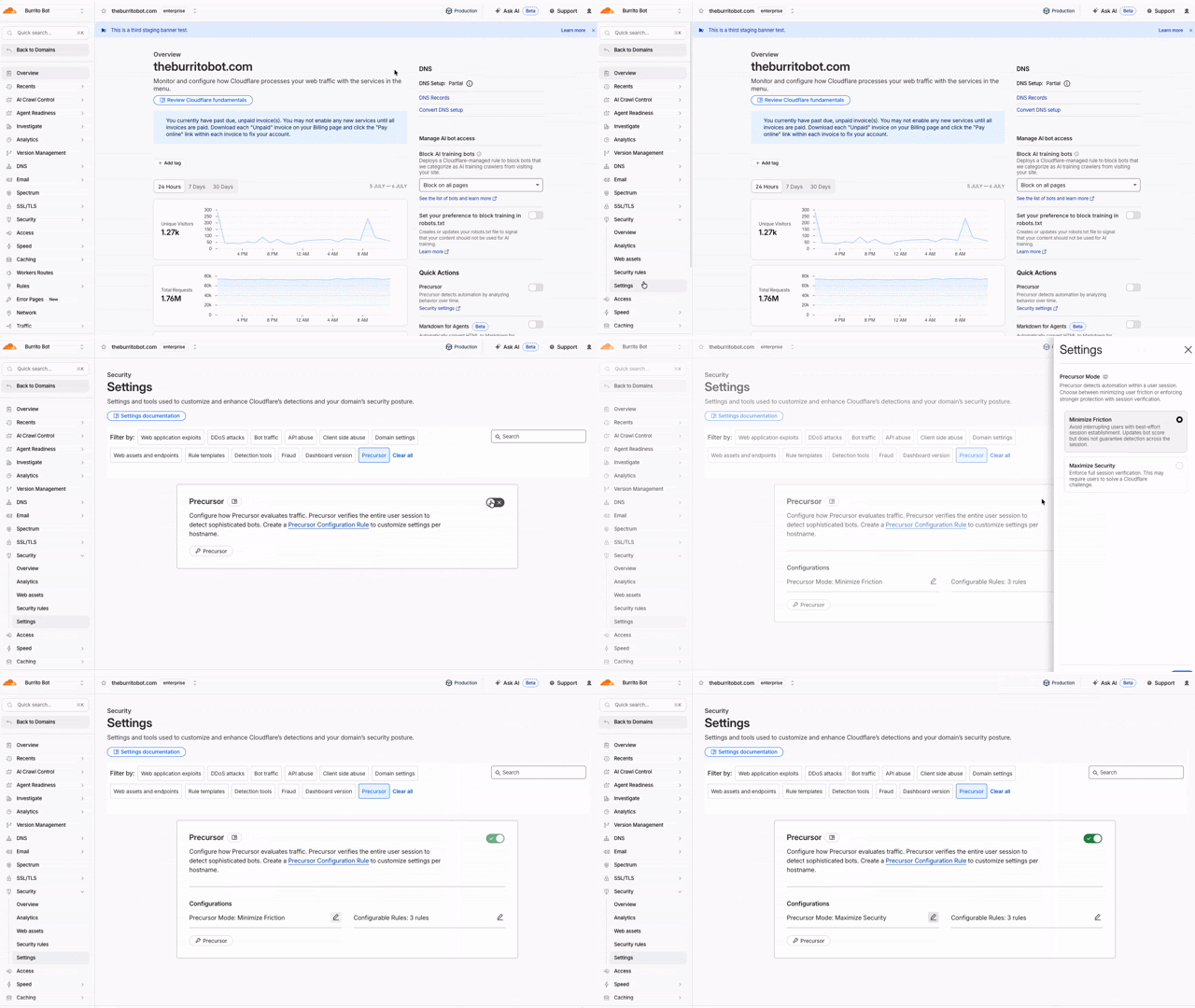
Precursor is rolling out to all customers starting today. Precursor is client-side JavaScript that enables session-based bot detection.
You can read the announcement blog ↗ for background on why we built Precursor and how session-level behavioral detection works.
With Precursor enabled, Cloudflare can:
Continuously evaluate behavioral signals across a session
Re-validate challenge clearance as behavior changes
Update bot scores with session context
Provide client-side visibility where none previously existed
It integrates with existing protections, including Security Rules, and can be enabled directly from the Cloudflare dashboard with configurable modes to balance security and user experience.
On October 5, 2026, two changes take effect across the Zero Trust Networks API and Cloudflare Tunnel API: the CIDR-encoded route endpoints are removed, and tunnel list and get responses no longer include the connections field. If you manage private network routes or read tunnel connection details through the API, cloudflared, Terraform, or another integration, review the changes in the following sections and migrate before the removal date.
Route endpoints
The CIDR-encoded route endpoints are deprecated in favor of the standard, route_id-based endpoints that already exist today. Both sets of endpoints route a private network through Cloudflare Tunnel or Cloudflare Mesh (the API still refers to Mesh nodes as warp_connector) — only the request shape changes.
Capture each route's route_id by calling List tunnel routes, or read it from the response the first time you create a route with the replacement endpoint.
Update any scripts, backend services, or CI/CD pipelines that call the CIDR-encoded endpoints directly.
If you manage routes with the cloudflared tunnel route ip add | delete commands, upgrade cloudflared to the latest version ↗.
# Before: create a route by URL-encoding the CIDR into the pathcurl https://api.cloudflare.com/client/v4/accounts/$ACCOUNT_ID/teamnet/routes/network/172.16.0.0%2F16 \ -H 'Content-Type: application/json' \ -H "Authorization: Bearer $CLOUDFLARE_API_TOKEN" \ -d '{"tunnel_id": "'$TUNNEL_ID'", "comment": "Example comment for this route."}'# After: create a route with the network in the request bodycurl https://api.cloudflare.com/client/v4/accounts/$ACCOUNT_ID/teamnet/routes \ -H 'Content-Type: application/json' \ -H "Authorization: Bearer $CLOUDFLARE_API_TOKEN" \ -d '{"network": "172.16.0.0/16", "tunnel_id": "'$TUNNEL_ID'", "comment": "Example comment for this route."}'# After: update or delete a route using its route_idcurl -X PATCH https://api.cloudflare.com/client/v4/accounts/$ACCOUNT_ID/teamnet/routes/$ROUTE_ID \ -H 'Content-Type: application/json' \ -H "Authorization: Bearer $CLOUDFLARE_API_TOKEN" \ -d '{"comment": "Updated comment for this route."}'curl -X DELETE https://api.cloudflare.com/client/v4/accounts/$ACCOUNT_ID/teamnet/routes/$ROUTE_ID \ -H "Authorization: Bearer $CLOUDFLARE_API_TOKEN"
Cloudflare Tunnel and Cloudflare Mesh connections
Starting the same day, the connections array is removed from list and get responses for Cloudflare Tunnel and Cloudflare Mesh nodes (the cfd_tunnel and warp_connector API resources). Query the dedicated connections endpoint instead of reading the field off the tunnel or node object.
Update any dashboards, monitoring scripts, or automation that parses connections from the tunnel list or get response. cloudflared and the Cloudflare Terraform provider do not read this field, so no changes are required on their side for this part of the update.
Why we are making these changes
Smaller, faster responses. Cloudflare Tunnel and Cloudflare Mesh nodes with many connections no longer inflate every list and get call — connection detail is only fetched when you need it.
A single way to identify a route. Consolidating on route_id removes the need to URL-encode CIDR ranges into the path and matches how every other resource in the Zero Trust Networks API is addressed.
Consistency across the API. Both changes align these endpoints with Cloudflare's standard REST conventions for resource identifiers and nested detail endpoints.
Not all AI traffic is the same. Now, all customers — including those on the Free plan — can manage AI crawlers based on what they actually do on your site. Cloudflare groups AI traffic into three behaviors you can control independently: Search, Agent, and Training. This lets you keep the automated traffic that sends readers and revenue back to you, while blocking the traffic that only takes from your content.
Each behavior maps to a real use case. Search covers crawlers that index your content so they can answer questions about it later, where you should expect referral traffic or other equitable compensation in return. Agent covers automated activity acting in real time on a person's behalf, such as chat fetch bots and browser-use agents. Training covers crawlers that take your content to train or fine-tune a model. For each preset you can choose to block on all pages, block only on pages that display ads, or choose not to block.
Starting September 15, 2026, new domains onboarding to Cloudflare receive updated defaults: Bots classified as Training or as Agent are blocked on pages that display ads, while Search remains allowed. On that date, multi-purpose crawlers that combine Search and Training will be affected by the new defaults to block Training. All customers can opt out of the new defaults ↗ at any time before September 15.
With Content Independence Day 2026, Enterprise Bot Management customers get two new tools that make bot traffic far easier to see and reason about: BotBase, a searchable directory of every bot Cloudflare tracks, and Attribution Business Insights, a dashboard that shows how much value each crawler sends back to your business.
BotBase is Cloudflare's directory of all known bots and agents, available directly in the dashboard. It shows how Cloudflare classifies each bot by behavior — Search, Agent, Training, and other categories such as Transact, Data Collection, SEO, and Ads Verification — so you can understand why a given crawler is visiting you. You can search and filter the full catalogue, filter your own traffic down to a single bot to investigate its activity on your zone, and copy any bot's detection ID to target it precisely in Security rules. Every tracked bot in BotBase is also published in Cloudflare Radar's bots and agents directory ↗.
Attribution Business Insights is built for content owners and business decision-makers who want to know which bots help or harm their business, without reading rule syntax. The dashboard reports crawl-to-referral ratios both site-wide and per bot operator — comparing how often a company crawls your content against how many visitors it actually refers back — over the last 24 hours, 7 days, or 30 days. Each operator is labeled with Cloudflare's updated classification and an action status of Allowed, Blocked, or Partially blocked, giving stakeholders a shared, at-a-glance view of the AI traffic reaching your site.
This release adds targeted coverage for a path traversal flaw in Fortinet FortiSandbox (CVE-2026-39813) and transitions the Anomaly:Header:User-Agent - Fake Bing or MSN Bot rule action from Block to Disabled.
Key Findings
CVE-2026-39813: A path traversal vulnerability in Fortinet FortiSandbox allows remote, unauthenticated attackers to read arbitrary files from the underlying filesystem due to insufficient validation of user-supplied input paths.
Regional Services now supports Regionalized IP Bindings, letting you regionalize traffic at the IP layer for prefixes you bring to Cloudflare through Bring Your Own IP (BYOIP).
Where Regional Hostnames regionalize traffic by hostname, Regionalized IP Bindings let you bind a CIDR from one of your prefixes to a region — ideal for address-map deployments and any service you address by IP rather than hostname. Cloudflare then terminates TLS and processes traffic to those addresses only within the data centers in that region.
Regionalized IP Bindings requires the Regional Services and Regional Services for BYOIP entitlements. Contact your account team to enable them.
This week's release introduces new managed protection to address a critical pre-authentication OS command injection vulnerability in Ivanti Sentry (CVE-2026-10520).
Key Findings
CVE-2026-10520: An OS command injection vulnerability in Ivanti Sentry allows remote, unauthenticated attackers to execute arbitrary system commands with root privileges. The flaw stems from improper sanitization of input strings parsed during internal configuration handling.
The Routes page in the Cloudflare dashboard now shows the routes across all of your connectors — Cloudflare Mesh and Cloudflare Tunnel routes alongside Cloudflare WAN and Magic Transit static routes — in a single table, instead of a separate routes view per product.
From the unified Routes page you can:
Visualize your network with an interactive map that shows how your destinations flow through to your connectors — including equal-cost multi-path (ECMP) routes where the same prefix is served by several connectors. Select a node to filter the table down to the routes behind it.
See every route in one table, with its destination, type, connector, priority, and source, and filter or sort to find what you need.
Create, edit, and delete routes of any supported type without leaving the page. When adding a Cloudflare WAN or Magic Transit static route, you now pick the next hop by connector name instead of typing its IP.
Your existing routes, APIs, and configurations are unchanged — this is a dashboard experience that brings them together in one place. Learn how to add routes and manage virtual networks.
Cloudflare now accepts ML-DSA ↗ (FIPS 204) post-quantum certificates on the connection between Cloudflare's edge and your origin server. Combined with our existing X25519MLKEM768 key agreement, this lets you establish end-to-end post-quantum authentication on the Cloudflare-to-origin connection.
ML-DSA is supported in two origin-facing features:
Authenticated Origin Pulls (AOP) — upload an ML-DSA client certificate that Cloudflare will present during the mTLS handshake to your origin. Available at both zone-level and per-hostname scopes.
You can now match incoming requests against Cloudforce One threat intelligence in your WAF rules. A new detection looks up the client IP address of each request against the threat intelligence database. If the IP was involved in threat activity in the past seven days, Cloudflare populates cf.intel.ip.* fields that you can use in custom rules and rate limiting rules.
The detection populates the following fields. Use the any() function with the [*] wildcard to match array values:
cf.intel.ip.datasets — the dataset that flagged the IP address (ddos or waf).
cf.intel.ip.target_industries — industries the IP address has targeted.
cf.intel.ip.attacker_names — known threat actors associated with the IP address.
cf.intel.ip.attacker_countries — source countries of the threat activity.
cf.intel.ip.target_countries — countries the IP address has targeted.
For example, the following custom rule expression blocks requests from IP addresses associated with DDoS activity that have targeted France:
any(cf.intel.ip.target_countries[*] == "FR") and any(cf.intel.ip.datasets[*] == "ddos")
These fields work with the Cloudflare API and Terraform. Matches are logged in Security Analytics.
The threat intelligence detection is available to customers with an active Cloudforce One subscription. For more information, refer to Threat intelligence.
This week's release introduces new managed protection to address a critical SQL injection vulnerability in Ghost CMS (CVE-2026-26980) and a new generic rule designed to identify and block sophisticated SQL Injection (SQLi) bypass attempts leveraging obfuscated boolean logic. These rules protect affected installations from unauthorized data exfiltration at the network edge.
Key Findings
CVE-2026-26980: A blind SQL injection vulnerability in the Ghost CMS Content API (versions 3.24.0 to 6.19.0) allows unauthenticated remote attackers to inject malicious SQL commands via query parameters due to improper input validation.
TL;DR: Brand Protection now features an Automated Cease & Desist (C&D) workflow. When you discover an infringing domain hosted outside of Cloudflare, you can instantly generate, review, and download a custom-branded, pre-filled legal notice in seconds.
Why this matters
This update introduces a major shift from pure detection to actionable enforcement, eliminating the manual burden for your Trust & Safety and Legal teams:
Instant WHOIS and Recipient Lookup: We automatically scrape registrar data and WHOIS contact information (such as the registrant or registrar abuse email) behind the scenes, highlighting exactly where your notice needs to be sent
Smart Template Automation: We pre-fill your custom-branded templates with essential metadata, including the infringing domain, registrar name, and discovery date.
Tailored Enforcement Tones: Choose from three default layout strategies depending on the severity of the infrastructure match:
Exact Match: A formal demand for identical trademark infringements
Similar Match: A standard notice optimized for typosquatting (one-character distance matches)
Friendly Tone: An amicable initial outreach for potential unintentional or accidental infringements
Full Editing Control: Before creating the final PDF, a real-time review screen allows you to fine-tune the messaging, modify placeholders, and ensure your text aligns perfectly with internal legal standards
How it works
When reviewing a malicious domain match inside your dashboard, your enforcement path splits depending on where the attacker is located:
On the Cloudflare Network: If the domain uses Cloudflare’s network or registrar, trigger our existing integrated abuse reporting flow with one click.
Hosted Elsewhere: If the domain is hosted on an external provider, click the Generate C&D Letter option to launch the new document builder, pick your template, verify the auto-populated recipient data, and download your finalized PDF.
You can manage your templates and enforce matches by going to the Cloudflare Dashboard > Application Security > Brand Protection and selecting your detected Brand Protection matches.
For more information, read the Brand Protection documentation.
Note: Cloudflare does not represent you and cannot provide you with legal advice. Only you can decide whether your rights have been infringed, whether a cease and desist letter is appropriate, and what that letter should say.