DeepSeek V4 Flash and DeepSeek V4 Pro are the first Workers AI models with a full one million (1,048,576) token context window. Use them for long-horizon agentic workflows, large codebases, and multi-step reasoning that exceed the context limits of every other model hosted on the platform.
DeepSeek V4 Flash is the faster, lower-cost sibling. This release supersedes the preview version with substantially enhanced agentic capabilities.
Key capabilities:
Reasoning: Both models support thinking mode for complex, step-by-step problem-solving.
Function calling: Build agents that invoke tools and APIs across multiple conversation turns.
Long context: Both models support a full 1,048,576 token context window.
Workers AI and AI Gateway now provide a unified path for accessing models and managing inference traffic. Use the same AI binding and REST API to call models hosted on Workers AI or by supported third-party providers, with AI Gateway providing observability, logging, caching, security, and billing controls.
Unified entrypoints and observability
The AI binding supports both Workers AI and third-party models through env.AI.run(). The REST API provides shared /ai/ endpoints with Cloudflare authentication across providers.
Route a Workers AI request through AI Gateway by specifying a gateway ID. Use default to automatically create a gateway on the first authenticated request, or specify an existing gateway to separate applications and workloads:
const response = await env.AI.run( "@cf/zai-org/glm-5.2", { messages: [{ role: "user", content: "What is the capital of France?" }], }, { gateway: { id: "default" }, },);
const response = await env.AI.run( "@cf/zai-org/glm-5.2", { messages: [{ role: "user", content: "What is the capital of France?" }], }, { gateway: { id: "default" }, },);
Requests routed through AI Gateway can be logged and included in analytics for request volume, errors, latency, token usage, and costs. You can also configure controls such as caching, rate limiting, and request retries on the gateway.
Unified billing and higher rate limits
You can now use prepaid AI Gateway credits to pay for Workers AI inference. This provides one credit balance for Workers AI and supported third-party model providers. To use credits for Workers AI, set the gateway's Workers AI billing setting to Unified billing. Workers AI requests routed through that gateway deduct from your credit balance in real time.
Prepaid credits also provide access to the following Workers AI frontier models without requiring the Workers Paid plan. Each frontier Workers AI model has a rate limit of 50 requests per minute per account, per model when billed with AI Gateway credits, compared to 20 requests per minute through standard Workers AI billing:
Sandbox SDK 1.0 is available to preview under the npm @next tag. For existing applications, the current stable package remains published on the 0.12.x line.
Sandbox SDK first shipped to provide a rich library for running untrusted and agent-driven work on Cloudflare Containers. Since then, both Sandbox and Containers have matured. This preview is a thinner SDK built on a richer Cloudflare Containers foundation.
npm i @cloudflare/sandbox@next
yarn add @cloudflare/sandbox@next
pnpm add @cloudflare/sandbox@next
bun add @cloudflare/sandbox@next
What this preview is
A single execution interface — sandbox.exec() takes an argument list, returns when the process starts, and gives you a handle for output, logs, waits, and signals. Both short commands and long-running services use the same API.
Removed session execution — the SDK no longer maintains shell state between executions. Each launch is independent. Pass cwd and env when you need them, or put multi-step shell syntax in one explicit shell command.
RPC as the only transport — the SDK talks to the container exclusively over RPC. Remove SANDBOX_TRANSPORT, transport on getSandbox(), and setTransport().
Improved PTY and terminal interface — interactive PTYs use createTerminal / connect, not the older session-shaped helpers.
Code interpreter as an extension — configure the code interpreter on your Sandbox subclass so you only ship what you need.
Start new projects on @next. Migrate existing apps when you can so you are ready when 1.0 becomes stable. Deploy the Worker package and container image from the same@next line.
Coding agents: install Cloudflare Skills ↗ (Agent setup). Use sandbox-next for @next (recommended for new projects), sandbox-stable for the current stable package, and sandbox-migrate-to-next when you are ready to port. Stable-package deprecated-API cleanup is in the 2026 deprecation guide.
The main Sandbox documentation still describes today's stable package. Preview docs:
The self-deployed Sandbox bridge is not currently part of this preview. We are working on bringing it in line with the latest code. Until then, use the stable bridge with the matching stable package and container image.
Timeline for 1.0
Further Cloudflare Containers features will let us keep reducing the size of the Sandbox SDK. We aim to ship Sandbox SDK 1.0 once those are in. In the meantime we continue to support and maintain the 1.0 preview (@next) alongside the current stable release.
AI Search gets you from a data source to a working search endpoint quickly. This release adds what you need to put that endpoint in front of real users: your own domain, authentication, and one endpoint across several instances. It also adds crawling for sites without a complete sitemap, so your index covers everything you want it to find.
Each of the following is a new option. The previous behavior is still the default, so nothing changes until you change it.
Serve search from your own domain
A public endpoint is a URL that a site or app can query directly, with no authentication in front of it. By default that URL is a generated hostname on search.ai.cloudflare.com. You can now serve the same endpoint from a custom domain, a hostname in a zone that you own:
https://search.example.com/search
Restrict who can query your content
Once your endpoint is on your own domain, you can put Cloudflare Access in front of it. For example, you usually want to give /mcp to specific agents rather than to anyone who finds the URL. Agents authenticate with an Access service token, and people who open the endpoint in a browser sign in through your identity provider.
Search several instances from one URL
A namespace can expose its own public endpoint with /search, /chat/completions, and /mcp paths that fan out across the instances you choose:
curl https://ns-<NAMESPACE_ENDPOINT_ID>.search.ai.cloudflare.com/search \
  --header "Content-Type: application/json" \
  --data '{
    "messages": [{ "content": "How do I configure AI Search?", "role": "user" }],
    "ai_search_options": { "instance_ids": ["docs", "support"] }
  }'
Index your sites without a sitemap
Website data sources support a new discoverparse type. It starts at the source URL and collects pages from both your sitemaps and the links it finds while crawling:
Kitesurf is Cloudflare's new stateless, highly scalable browser that runs entirely on top of Workers and is designed for AI agents. It is available for free while in beta.
Compared to Chromium, Kitesurf uses 3–7× less CPU and memory for common agentic tasks like screenshots and HTML extraction, so you can run more sessions and scale better for bursty, AI-driven workloads.
Your existing clients already work. To opt in, add the browser=kitesurf parameter to any Browser Run CDP or Quick Action endpoint:
AI Gateway now includes User Insights, a dashboard that gives you two things at once: clear visibility into how much your organization spends on AI, and a security signal that surfaces users whose usage suddenly looks abnormal. It works on the traffic already flowing through your gateway, so there is no additional setup.
On the spend side, User Insights shows organization-wide totals for cost, requests, tokens, and adoption, and lets you drill into an individual user to see their spend, top models and providers, cache hit rate, and more. To attribute usage to individual users, add a user identifier with custom metadata or put your gateway behind Cloudflare Access.
On the security side, User Insights baselines each user's normal usage from their 95th percentile (p95) session cost over the last 30 days, then flags sessions that exceed both that baseline and an organization-level threshold. A sudden jump above a user's own pattern is often the first sign of a compromised credential or a misbehaving agent, so you can investigate before it shows up on your bill.
User Insights is available to all AI Gateway customers at no additional cost.
AI Gateway now integrates with Cloudflare Access, giving you two new capabilities:
Protect your gateway endpoint. Put your AI Gateway behind Access so you can set policies that control who is allowed to call a specific gateway's endpoint.
Identity-aware controls. When traffic reaches AI Gateway through an Access-protected custom domain, AI Gateway can use the authenticated user's Access identity in logs, analytics, routing, and spend controls.
With identity-aware controls, you can set spend limits by authenticated user, control which gateways different users can access, filter logs by user, and build policies without passing user IDs from the client application. AI Gateway adds the verified Access user ID to request metadata as cf.user_id.
Agent tracing is now available for applications built with the Agents SDK. Traces show each agent turn alongside model calls, tool runs, approvals, token usage, and Workers runtime operations.
Turn on Workers tracing in your Wrangler configuration:
Think and Flue applications emit agent traces automatically. For direct AI SDK calls, wrap the AI SDK namespace once. wrapAISDK() supports AI SDK v6 and v7. This AI SDK v7 example also supplies the agent identity:
import * as ai from "ai";import { wrapAISDK } from "agents/observability/ai";const tracedAI = wrapAISDK(ai);await tracedAI.generateText({ model, prompt: "Find an available appointment", runtimeContext: { agentId: "booking-agent-production", conversationId: "conversation-123", }, telemetry: { functionId: "booking-agent", includeRuntimeContext: { agentId: true, conversationId: true, }, },});
import * as ai from "ai";import { wrapAISDK } from "agents/observability/ai";const tracedAI = wrapAISDK(ai);await tracedAI.generateText({ model, prompt: "Find an available appointment", runtimeContext: { agentId: "booking-agent-production", conversationId: "conversation-123", }, telemetry: { functionId: "booking-agent", includeRuntimeContext: { agentId: true, conversationId: true, }, },});
Message and tool payload recording is off by default. Turn it on only when the payloads are safe to store:
Open the Agents tab ↗ in the Cloudflare dashboard to inspect sessions, replay conversations, and view trace waterfalls. For advanced setup, privacy controls, and trace structure, refer to Agent tracing.
You can now store up to 20 million vectors in a single Vectorize index, doubling the previous limit of 10 million vectors. This enables larger-scale semantic search, recommendation systems, and retrieval-augmented generation (RAG) applications without splitting data across multiple indexes.
Vectorize continues to support indexes with up to 1,536 dimensions per vector at 32-bit precision. Refer to the Vectorize limits documentation for complete details.
We're releasing an early preview of @cloudflare/computer ↗, an open-source agent runtime that gives every agent its own computer. The runtime dynamically orchestrates between fast, efficient isolates and full Linux containers, so the agent always runs on the right compute primitive for the task at hand.
@cloudflare/computer provides a virtual filesystem backed by SQLite, which you can populate from cloud storage, source control, or any files you choose. Agents can read, write, and edit files, run shell commands, and interact with Git repositories. All operations are gated, audited, and observed.
Install the package via npm:
npm install @cloudflare/computer
Instantiate a Workspace inside any Durable Object to give your agent a filesystem and execution runtime:
import { Workspace } from "@cloudflare/computer";export class Agent { workspace = new Workspace({ storage: this.ctx.storage, });}
Several execution backends are included or you can write your own:
Isolate runtime — fast, horizontally scalable execution via just-bash and Dynamic Workers, ideal for file manipulation and data processing.
Container runtime — full Linux environment via Cloudflare Containers, mounted through FUSE, for tasks that need native binaries, package managers, or a complete userland.
The AI SDK-compatible toolkit provides common agent tools (read, write, edit, ls, exec) and guides the model to choose the appropriate backend for each task.
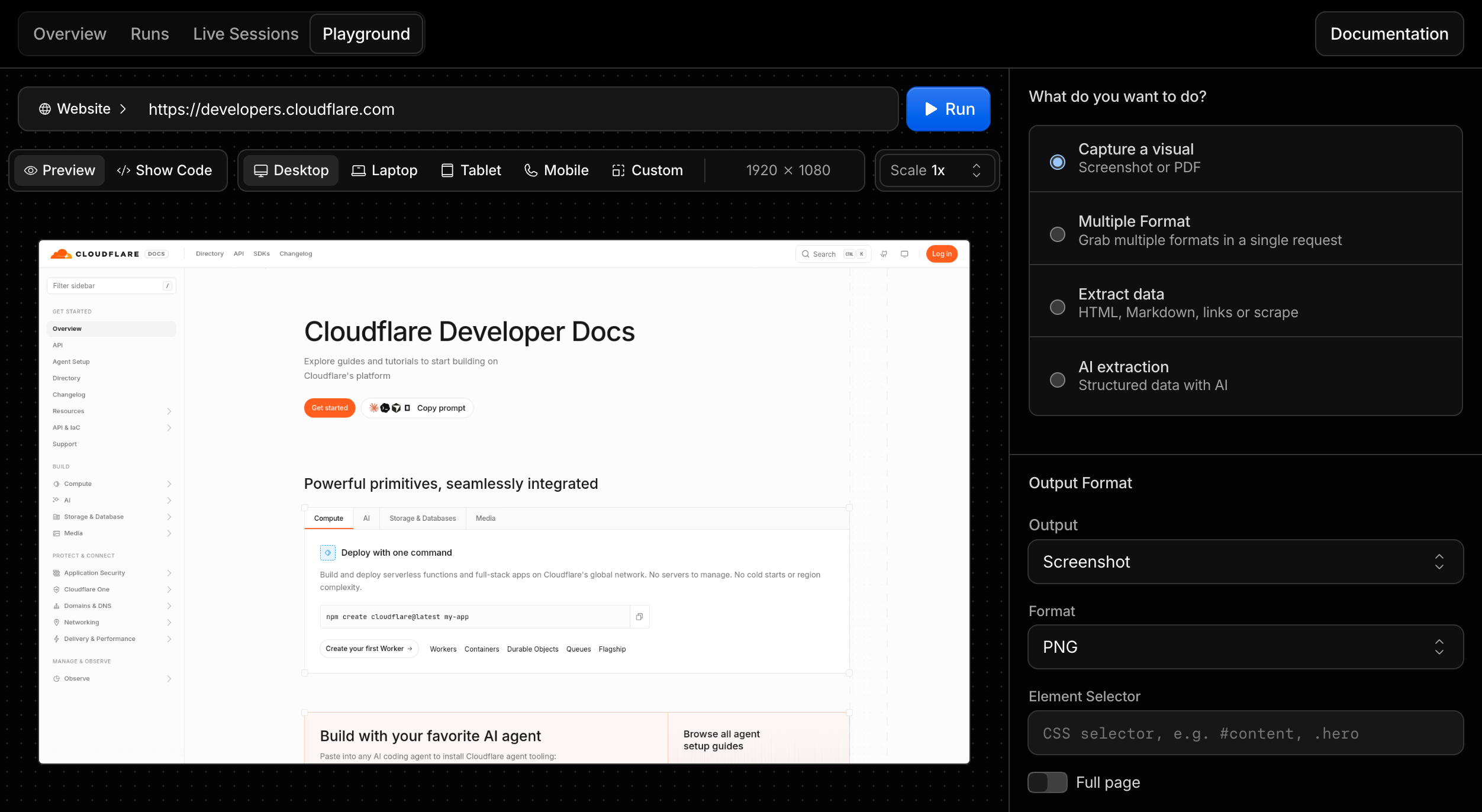
Browser Run now includes a Playground in the Cloudflare dashboard. Use it to try Quick Actions against a live browser without creating a Worker, installing an SDK, or deploying code first.
The Playground helps you test a target URL or raw HTML input, tune viewport and page-load settings, preview the output, and copy working code for the same request.
You can also configure desktop, laptop, tablet, mobile, or custom viewport sizes, set browser scale, choose page-load conditions, set timeouts, and wait for selectors before running a request.
Select Show Code to generate the same request as cURL, TypeScript SDK, Python, or Workers Binding code. For example, a screenshot request can be copied as a Workers Binding call:
You can now use AI Search directly from popular agent frameworks, adding grounded retrieval to an existing app instead of calling the REST API by hand. The new Agents section has guides for the Vercel AI SDK, LangChain, and the Cloudflare Agents SDK. The AI SDK integration is a new package, and the LangChain integration is a new retriever in the existing langchain-cloudflare package.
Vercel AI SDK
The ai-search-provider ↗ package connects AI Search to the AI SDK, and targets AI SDK v6 (ai@^6). Pass instance.chat() to generateText or streamText to generate a response grounded in your indexed content, with the retrieved chunks returned as sources. You can also expose instance.search() as a tool for agent loops.
The langchain-cloudflare package (PyPI ↗, GitHub ↗) provides CloudflareAISearchRetriever, a standard LangChain retriever backed by AI Search. Use it on its own, wrap it with create_retriever_tool to give an agent a search tool, or drop it into a RAG chain. It works with REST credentials or a Worker binding inside a Python Worker.
from langchain_cloudflare import CloudflareAISearchRetrieverretriever = CloudflareAISearchRetriever( account_id=ACCOUNT_ID, api_token=API_TOKEN, instance_name="knowledge-base", retrieval_type="hybrid",)docs = retriever.invoke("How do I configure Workers AI?")
Cloudflare Agents SDK
The Cloudflare Agents SDK could already reach AI Search through the Workers binding. The new guide walks through building a stateful chat agent that provisions its own instance, indexes content, and searches it from a tool.
import { tool } from "ai";import { z } from "zod";const instance = env.AI_SEARCH.get("knowledge-base");// Expose AI Search to the agent's model as a tool it can call.const searchKnowledgeBase = tool({ description: "Search the knowledge base for relevant content.", inputSchema: z.object({ query: z.string() }), execute: ({ query }) => instance.search({ query }),});
import { tool } from "ai";import { z } from "zod";const instance = env.AI_SEARCH.get("knowledge-base");// Expose AI Search to the agent's model as a tool it can call.const searchKnowledgeBase = tool({ description: "Search the knowledge base for relevant content.", inputSchema: z.object({ query: z.string() }), execute: ({ query }) => instance.search({ query }),});
For the full walkthroughs, including creating an instance and indexing content, refer to the Agents guides.
Cloudflare's product-specific MCP servers now support the new MCP 2026-07-28 Specification. Each request runs on a fresh stateless server without an MCP protocol session or protocol-specific Durable Object.
The /mcp endpoint also accepts stateless requests from 2025 Streamable HTTP clients. Most clients can reconnect without configuration changes.
Use /mcp for new connections. Historical /sse URLs continue to work as aliases for the same Streamable HTTP handler, but they no longer serve the deprecated HTTP+SSE transport. If a client forces SSE transport, change it to Streamable HTTP or automatic transport detection.
Browser Run now supports structured handoff for Human in the Loop workflows. Using Cloudflare-specific CDP commands, your agent can signal that it needs help, a human steps in through Live View to handle the task, and the agent resumes once the work is done.
For agents running multi-step browser workflows, a single login wall or unexpected prompt can fail the entire run. Previously, scripts had to manage human intervention manually by sharing a Live View URL and polling for completion. Structured handoff replaces this with a formal pause-and-resume flow.
The following example requests human intervention for a login page and waits for the human to finish before continuing:
const cdp = await page.createCDPSession();// Get Live View URL for the human operatorconst { devtoolsFrontendUrl } = await cdp.send("Cloudflare.getLiveView", { mode: "tab",});console.log(`Human input needed: ${devtoolsFrontendUrl}`);// Request human intervention and wait for completionconst handoffComplete = new Promise((resolve) => { cdp.once("Cloudflare.handoffComplete", resolve);});await cdp.send("Cloudflare.handoff", { instructions: "Please log in with your credentials", timeout: 600000,});const result = await handoffComplete;console.log(result.success ? "Handoff complete" : `Failed: ${result.reason}`);
We are limiting Workers Free plan access to a few resource-intensive models so we can prioritize capacity for the broader Workers AI user base. This helps everyone get a more reliable inference experience, with fewer 429 and 3040 (Out of Capacity) errors.
On the Workers Free plan, requests to these models now return a 403 HTTP error (internal error 5035) prompting you to upgrade. The Workers Paid plan starts at $5 per month and still includes the 10,000 free Neurons per day allocation, with usage beyond that billed at each model's pricing.
Many models remain available on the Workers Free plan, including:
Agents SDK v0.20.0 adds client and server support for the MCP 2026-07-28 release candidate ↗. Workers can serve tools, prompts, resources, and elicitation without an MCP transport session or Durable Object. Agents can connect to both MCP 2026-07-28 servers and existing legacy servers.
Client support
The MCP client manager now uses @modelcontextprotocol/client. For each connection, it probes for MCP 2026-07-28 support with server/discover. If the server does not support the stateless protocol, the client continues with the legacy initialize handshake on the same connection. Existing addMcpServer calls do not need a protocol-version setting or separate clients for each protocol generation.
For stateless requests, elicitation uses input_required through multi-round-trip requests (MRTR). The legacy path uses the same form and URL handlers for pushed requests. The SDK collects input, retries the original operation, and resolves the original callTool, getPrompt, or readResource promise with its final result.
OAuth callbacks now validate issuer metadata through the v2 SDK. Discovery state and issuer-bound credentials persist across browser redirects and Durable Object hibernation.
Run stateless servers
createMcpHandler now accepts a factory that returns a server from @modelcontextprotocol/server. The factory creates an isolated server for each request.
The isolated agents/mcp/server entry keeps McpAgent, WorkerTransport, MCP client transports, and SDK v1 modules out of stateless server bundles.
The Workers wrapper validates present browser Origins, supports explicit delegation to trusted Origin middleware, and exposes request handling plus typed change notifications.
Backward compatibility
The same createMcpHandler(createServer)(request, env, ctx) route serves MCP 2026-07-28 clients and legacy clients that use stateless requests. You do not need separate routes or tool definitions for ordinary tools, prompts, and resources.
McpAgent is deprecated and feature-frozen. Migrate existing McpAgent servers to the stateless handler at your earliest convenience. If a server depends on protocol sessions, RPC, pushed server-to-client requests, standalone streams, or replay, use the migration guide to design stateless equivalents and run both routes while clients transition.
Migrate existing SDK v1 servers
Upgrade the Agents SDK:
npm i agents@latest
yarn add agents@latest
pnpm add agents@latest
bun add agents@latest
Move ordinary SDK v1 server definitions into an SDK v2 factory and serve them with createMcpHandler. The handler's default legacy compatibility means most stateless deployments need only one route.
If an existing McpAgent server still needs sessionful features, add the stateless path beside it. Use isLegacyRequest() to send only legacy traffic to the existing route:
Migrate the remaining sessionful features, allow existing sessions to drain, then remove the legacy route. Refer to Migrate to MCP SDK v2 for package changes, compatibility limits, and rollout steps.
Deprecations in v0.20.0
This release deprecates the following Agents SDK APIs:
Deprecated API
Replacement
Status
McpAgent
Use an SDK v2 factory with createMcpHandler for stateless servers. Use the migration guide to replace stateful features before removing a legacy route.
Feature-frozen. No removal version is announced.
createMcpHandler(v1Server, options)
Move the server to an SDK v2 factory and call createMcpHandler(factory, options). Use createLegacyMcpHandler only as a temporary bridge for sessionful features.
Scheduled for removal in the next major version.
MCPClientManager.callTool(params, resultSchema, options) and the equivalent withX402Client overload
Use callTool(params, options) or callTool(confirm, params, options).
Compatibility overload. No removal version is announced.
The MCP 2026-07-28 draft separately deprecates Roots, Sampling, Logging, the old HTTP+SSE transport, and Dynamic Client Registration.
The agents, @cloudflare/ai-chat, @cloudflare/codemode, and @cloudflare/think packages now support AI SDK v6 and v7. Existing applications can remain on v6 when updating these packages. Applications can also adopt v7 without changing the Cloudflare Agents APIs they use.
The supported peer ranges are ai@^6 || ^7 and @ai-sdk/react@^3 || ^4. Use matching major versions: pair AI SDK v6 with @ai-sdk/react v3, or pair AI SDK v7 with @ai-sdk/react v4.
To install the latest packages with AI SDK v7:
npm i agents@latest @cloudflare/ai-chat@latest @cloudflare/codemode@latest @cloudflare/think@latest ai@^7 @ai-sdk/react@^4
bun add agents@latest @cloudflare/ai-chat@latest @cloudflare/codemode@latest @cloudflare/think@latest ai@^7 @ai-sdk/react@^4
Think normalizes streaming, tool completion events, and telemetry across both AI SDK versions. Existing v6 applications do not need to migrate these integrations before updating Think.
This release reduces repeated MCP schema conversion and adds an opt-out for Think's automatic MCP tool exposure. It also lets non-AI-SDK hosts invoke the durable Code Mode runtime directly.
Control direct MCP tool exposure in Think
Agents SDK MCP clients now reuse converted input and output schemas while a live connection keeps the same tool catalog. This avoids converting every MCP JSON Schema to Zod again for each model turn.
@cloudflare/think also adds includeMcpTools. Set it to false when you expose MCP tools through Code Mode or another mechanism outside Think's automatic tool set:
import { Think } from "@cloudflare/think";export class MyAgent extends Think { includeMcpTools = false; waitForMcpConnections = true;}
import { Think } from "@cloudflare/think";export class MyAgent extends Think<Env> { includeMcpTools = false; waitForMcpConnections = true;}
This setting skips Think's automatic getAITools() call. MCP registration, restoration, discovery, raw catalog access, direct calls, and Code Mode connectors continue to work.
@cloudflare/codemode@latest adds execute(), search(), and describe() to the durable runtime handle. MCP servers and other hosts can now execute code and discover connector methods without adapting the runtime to an AI SDK tool.
Search and describe results include requiresApproval: true for protected connector methods. Resolve a paused execution with the existing approve() and reject() methods.
Devin Outposts ↗ lets you run Devin agents on Cloudflare. Each Devin session runs in its own isolated sandbox backed by Cloudflare Containers, so agents can execute code and use development tooling in an isolated environment.
Use Devin Outposts when you want Devin sessions to run on Cloudflare managed infrastructure, with each session isolated from the others.
Agents connected to Model Context Protocol (MCP) servers with addMcpServer can now handle elicitation ↗ requests.
Elicitation lets an MCP server request user input while it handles a tool call. Form mode collects structured, non-sensitive data. URL mode asks for consent before opening an out-of-band flow, such as third-party authorization or payment.
sequenceDiagram
    participant User
    participant Agent as Agent (MCP client)
    participant Server as MCP server
    participant Browser

    Server->>Agent: elicitation/create
    Agent->>User: Show server, reason, and input or URL
    User->>Agent: Submit, open, decline, or cancel
    Agent->>Browser: Open URL after consent (URL mode)
    Agent->>Server: accept, decline, or cancel
    Server-->>Agent: Optional URL completion notification
Register a handler for each mode your Agent supports in onStart():
import { Agent } from "agents";export class MyAgent extends Agent { onStart() { this.mcp.configureElicitationHandlers({ form: (request, serverId) => this.forwardToUser(request, serverId), url: (request, serverId) => this.forwardToUser(request, serverId), }); } forwardToUser(request, serverId) { // Show the request in your UI and resolve after the user responds. throw new Error( `Implement elicitation for ${serverId}: ${request.params.message}`, ); }}
import { Agent } from "agents";import type { ElicitRequest, ElicitResult } from "agents/mcp";export class MyAgent extends Agent<Env> { onStart() { this.mcp.configureElicitationHandlers({ form: (request, serverId) => this.forwardToUser(request, serverId), url: (request, serverId) => this.forwardToUser(request, serverId), }); } private forwardToUser( request: ElicitRequest, serverId: string, ): Promise<ElicitResult> { // Show the request in your UI and resolve after the user responds. throw new Error( `Implement elicitation for ${serverId}: ${request.params.message}`, ); }}
Connections advertise only the modes with configured handlers. An Agent without handlers advertises no elicitation capability, which lets the server use its fallback. The SDK stores the advertised modes with each MCP server registration so they survive Durable Object hibernation. Callback functions remain in memory and reattach when onStart() runs.
In AI Search, you can upload files to an instance, or connect a data source such as an R2 bucket, to make your content searchable with natural language. Each file becomes an item identified by an object key (its filename or path). The list items endpoint returns the items in an instance.
That endpoint now accepts a key query parameter, so you can look up a single item by its exact object key without paging through the full list. This complements the existing item_id filter for when you know the key but not the ID.
Keys are unique per data source, so combine key with source (for example, source=builtin) to disambiguate when the same key exists across multiple sources.
Workers AI Markdown conversion (toMarkdown) now supports .gif and .bmp image files, in addition to the JPEG, PNG, WebP, and SVG formats already supported.
GIF and BMP files run through the same image pipeline as other formats. Each image is resized if needed (and for animated GIFs, only the first frame is used), then passed to an object-detection model to identify what it contains. Those detected objects prompt a vision model that writes a natural-language description of the image, which becomes searchable, machine-readable Markdown.
AI Search uses toMarkdown automatically to process the files it ingests, so any .gif and .bmp files are included the next time your index syncs, with no configuration changes required. This helps when your content mixes formats, for example a support knowledge base full of screenshots or an archive of BMP scans.
Partnering with Moondream ↗ to bring their latest model @cf/moondream/moondream3.1-9B-A2B to Workers AI. Moondream 3.1 is a fast vision language model built on a mixture-of-experts architecture with 9B total parameters and 2B active, delivering frontier-level visual reasoning while retaining fast, cost-efficient inference.
Moondream 3.1 is designed for real-world vision tasks, with a 32K token context window for handling complex queries and structured outputs.
Key capabilities
Query — ask open-ended questions about an image, with an optional reasoning parameter
Caption — generate short, normal, or long descriptions of an image
Point — return coordinates for objects matching a target phrase
Detect — return bounding boxes for objects matching a target phrase
Real-time vision at the edge
Vision workloads like live camera feeds, robotics, content moderation, and interactive agents need answers in milliseconds, not seconds. Moondream 3.1's small active footprint (2B active parameters) pairs well with Workers AI's serverless, globally distributed inference: requests run close to your users, and streaming responses start returning tokens almost immediately.
In our testing, first tokens streamed back in roughly 20–30 ms, and results were fast across every task. The example end-to-end times below (client-observed median, including network round trip) are for a simple, single-subject image. Actual latency depends heavily on the image and how much detail you ask for.
Task
End-to-end (p50)
query
~770 ms
caption
~480 ms
point
~145 ms
detect
~160 ms
At these speeds you can call the model inline while handling a request rather than pushing the work to a background queue or a separate service. That opens up use cases where a slow response breaks the experience: moderating user-uploaded images before they are stored, locating an object in a video frame to drive a live overlay, extracting fields from a document during a form submission, or letting an agent inspect a screenshot and decide its next step within a single turn.
Get started
Use Moondream 3.1 through the Workers AI binding (env.AI.run()) or the REST API at /ai/run. You can also use AI Gateway with these endpoints.
Browser Run now supports a standalone /accessibilityTree endpoint, giving agent and automation workflows direct access to the browser's accessibility tree for a rendered webpage.
An accessibility tree is the browser's structured view of a rendered page: roles, names, states, values, and hierarchy. It is useful for accessibility tooling, but also for AI agents and automation workflows that need page structure without the noise of raw HTML or the cost of screenshots.
For AI agents, this means less inference from pixels and less parsing HTML. You can provide the page structure directly, helping agents identify available elements and determine which actions they can take.
With the new /accessibilityTree endpoint, you can request the accessibility tree directly when you only need the semantic structure of a page. If you need multiple page formats in a single API call, you can use the /snapshot endpoint, which also returns Markdown, HTML, and screenshots.