

Skip to content

Changelog

New updates and improvements at Cloudflare.

New Confidence Intervals in GraphQL Analytics API

The GraphQL Analytics API now supports confidence intervals for sum and count fields on adaptive (sampled) datasets. Confidence intervals provide a statistical range around sampled results, helping verify accuracy and quantify uncertainty.

  • Supported datasets: Adaptive (sampled) datasets only.
  • Supported fields: All sum and count fields.
  • Usage: The confidence level must be provided as a decimal between 0 and 1 (e.g. 0.90, 0.95, 0.99).
  • Default: If no confidence level is specified, no intervals are returned.

For examples and more details, see the GraphQL Analytics API documentation.
Larger Container instance types

New instance types provide up to 4 vCPU, 12 GiB of memory, and 20 GB of disk per container instance.

Instance Type vCPU Memory Disk
lite 1/16 256 MiB 2 GB
basic 1/4 1 GiB 4 GB
standard-1 1/2 4 GiB 8 GB
standard-2 1 6 GiB 12 GB
standard-3 2 8 GiB 16 GB
standard-4 4 12 GiB 20 GB

The dev and standard instance types are preserved for backward compatibility and are aliases for lite and standard-1, respectively. The standard-1 instance type now provides up to 8 GB of disk instead of only 4 GB.

See the getting started guide to deploy your first Container, and the limits documentation for more details on the available instance types and limits.

Expanded File Type Controls for Executables and Disk Images

You can now enhance your security posture by blocking additional application installer and disk image file types with Cloudflare Gateway. Preventing the download of unauthorized software packages is a critical step in securing endpoints from malware and unwanted applications.

We have expanded Gateway's file type controls to include:

  • Apple Disk Image (dmg)
  • Microsoft Software Installer (msix, appx)
  • Apple Software Package (pkg)

You can find these new options within the Upload File Types and Download File Types selectors when creating or editing an HTTP policy. The file types are categorized as follows:

  • System: Apple Disk Image (dmg)
  • Executable: Microsoft Software Installer (msix), Microsoft Software Installer (appx), Apple Software Package (pkg)

To ensure these file types are blocked effectively, please note the following behaviors:

  • DMG: Due to their file structure, DMG files are blocked at the very end of the transfer. A user's download may appear to progress but will fail at the last moment, preventing the browser from saving the file.
  • MSIX: To comprehensively block Microsoft Software Installers, you should also include the file type Unscannable. MSIX files larger than 100 MB are identified as Unscannable ZIP files during inspection.

To get started, go to your HTTP policies in Zero Trust. For a full list of file types, refer to supported file types.

Return markdown

Users can now specify that they want to retrieve Cloudflare documentation as markdown rather than the previous HTML default. This can significantly reduce token consumption when used alongside Large Language Model (LLM) tools.

curl https://developers.cloudflare.com/workers/ -H 'Accept: text/markdown'  -v

If you maintain your own site and want to adopt this practice using Cloudflare Workers for your own users you can follow the example here.

WARP client for Windows (version 2025.7.176.0)

A new GA release for the Windows WARP client is now available on the stable releases downloads page.

This release contains minor fixes and improvements.

Changes and improvements

  • MASQUE is now the default tunnel protocol for all new WARP device profiles.
  • Improvement to limit idle connections in Gateway with DoH mode to avoid unnecessary resource usage that can lead to DoH requests not resolving.
  • Improvement to maintain TCP connections to reduce interruptions in long-lived connections such as RDP or SSH.
  • Improvements to maintain Global WARP override settings when switching between organizations.
  • Improvements to maintain client connectivity during network changes.

Known issues

  • For Windows 11 24H2 users, Microsoft has confirmed a regression that may lead to performance issues like mouse lag, audio cracking, or other slowdowns. Cloudflare recommends users experiencing these issues upgrade to a minimum Windows 11 24H2 KB5062553 or higher for resolution.

  • Devices using WARP client 2025.4.929.0 and up may experience Local Domain Fallback failures if a fallback server has not been configured. To configure a fallback server, refer to Route traffic to fallback server.

  • Devices with KB5055523 installed may receive a warning about Win32/ClickFix.ABA being present in the installer. To resolve this false positive, update Microsoft Security Intelligence to version 1.429.19.0 or later.

  • DNS resolution may be broken when the following conditions are all true:

    • WARP is in Secure Web Gateway without DNS filtering (tunnel-only) mode.
    • A custom DNS server address is configured on the primary network adapter.
    • The custom DNS server address on the primary network adapter is changed while WARP is connected.

    To work around this issue, reconnect the WARP client by toggling off and back on.

WARP client for macOS (version 2025.7.176.0)

A new GA release for the macOS WARP client is now available on the stable releases downloads page.

This release contains minor fixes and improvements.

Changes and improvements

  • Fixed a bug preventing the warp-diag captive-portal command from running successfully due to the client not parsing SSID on macOS.
  • Improvements to maintain Global WARP override settings when switching between organizations.
  • MASQUE is now the default tunnel protocol for all new WARP device profiles.
  • Improvement to limit idle connections in Gateway with DoH mode to avoid unnecessary resource usage that can lead to DoH requests not resolving.
  • Improvements to maintain client connectivity during network changes.
  • The WARP client now supports macOS Tahoe (version 26.0).

Known issues

  • macOS Sequoia: Due to changes Apple introduced in macOS 15.0.x, the WARP client may not behave as expected. Cloudflare recommends the use of macOS 15.4 or later.

  • Devices using WARP client 2025.4.929.0 and up may experience Local Domain Fallback failures if a fallback server has not been configured. To configure a fallback server, refer to Route traffic to fallback server.

WARP client for Linux (version 2025.7.176.0)

A new GA release for the Linux WARP client is now available on the stable releases downloads page.

This release contains minor fixes and improvements including an updated public key for Linux packages. The public key must be updated if it was installed before September 12, 2025 to ensure the repository remains functional after December 4, 2025. Instructions to make this update are available at pkg.cloudflareclient.com.

Changes and improvements

Known issues

  • Devices using WARP client 2025.4.929.0 and up may experience Local Domain Fallback failures if a fallback server has not been configured. To configure a fallback server, refer to Route traffic to fallback server.

Application granular controls for operations in SaaS applications

Gateway users can now apply granular controls to their file sharing and AI chat applications through HTTP policies.

The new feature offers two methods of controlling SaaS applications:

  • Application Controls are curated groupings of Operations which provide an easy way for users to achieve a specific outcome. Application Controls may include Upload, Download, Prompt, Voice, and Share depending on the application.
  • Operations are controls aligned to the most granular action a user can take. This provides a fine-grained approach to enforcing policy and generally aligns to the SaaS providers API specifications in naming and function.

Get started using Application Granular Controls and refer to the list of supported applications.

Regional Data in Cloudflare Radar

Radar now introduces Regional Data, providing traffic insights that bring a more localized perspective to the traffic trends shown on Radar.

The following API endpoints are now available:

All summary and timeseries_groups endpoints in HTTP and NetFlows now include an adm1 dimension for grouping data by first level administrative division (for example, state, province, etc.)

A new filter geoId was also added to all endpoints in HTTP and NetFlows, allowing filtering by a specific administrative division.

Check out the new Regional traffic insights on a country specific traffic page new Radar page.

WAF Release - 2025-09-29

This week highlights four important vendor- and component-specific issues: an authentication bypass in SimpleHelp (CVE-2024-57727), an information-disclosure flaw in Flowise Cloud (CVE-2025-58434), an SSRF in the WordPress plugin Ditty (CVE-2025-8085), and a directory-traversal bug in Vite (CVE-2025-30208). These are paired with improvements to our generic detection coverage (SQLi, SSRF) to raise the baseline and reduce noisy gaps.

Key Findings

  • SimpleHelp (CVE-2024-57727): Authentication bypass in SimpleHelp that can allow unauthorized access to management interfaces or sessions.

  • Flowise Cloud (CVE-2025-58434): Information-disclosure vulnerability in Flowise Cloud that may expose sensitive configuration or user data to unauthenticated or low-privileged actors.

  • WordPress:Plugin: Ditty (CVE-2025-8085): SSRF in the Ditty WordPress plugin enabling server-side requests that could reach internal services or cloud metadata endpoints.

  • Vite (CVE-2025-30208): Directory-traversal vulnerability in Vite allowing access to filesystem paths outside the intended web root.

Impact

These vulnerabilities allow attackers to gain access, escalate privileges, or execute actions that were previously unavailable:

  • SimpleHelp (CVE-2024-57727): An authentication bypass that can let unauthenticated attackers access management interfaces or hijack sessions — enabling lateral movement, credential theft, or privilege escalation within affected environments.

  • Flowise Cloud (CVE-2025-58434): Information-disclosure flaw that can expose sensitive configuration, tokens, or user data; leaked secrets may be chained into account takeover or privileged access to backend services.

  • WordPress:Plugin: Ditty (CVE-2025-8085): SSRF that enables server-side requests to internal services or cloud metadata endpoints, potentially allowing attackers to retrieve credentials or reach otherwise inaccessible infrastructure, leading to privilege escalation or cloud resource compromise.

  • Vite (CVE-2025-30208): Directory-traversal vulnerability that can expose filesystem contents outside the web root (configuration files, keys, source code), which attackers can use to escalate privileges or further compromise systems.

RulesetRule IDLegacy Rule IDDescriptionPrevious ActionNew ActionComments
Cloudflare Managed Ruleset100717SimpleHelp - Auth Bypass - CVE:CVE-2024-57727LogBlockThis rule is merged to 100717 in legacy WAF and in new WAF
Cloudflare Managed Ruleset100775Flowise Cloud - Information Disclosure - CVE:CVE-2025-58434LogBlockThis is a New Detection
Cloudflare Managed Ruleset100881WordPress:Plugin:Ditty - SSRF - CVE:CVE-2025-8085LogBlockThis is a New Detection
Cloudflare Managed Ruleset100887Vite - Directory Traversal - CVE:CVE-2025-30208LogBlockThis is a New Detection

WAF Release - 2025-09-28 - Emergency

This week highlights multiple critical Cisco vulnerabilities (CVE-2025-20363, CVE-2025-20333, CVE-2025-20362). This flaw stems from improper input validation in HTTP(S) requests. An authenticated VPN user could send crafted requests to execute code as root, potentially compromising the device.

Key Findings

  • Cisco (CVE-2025-20333, CVE-2025-20362, CVE-2025-20363): Multiple vulnerabilities that could allow attackers to exploit unsafe deserialization and input validation flaws. Successful exploitation may result in arbitrary code execution, privilege escalation, or command injection on affected systems.

Impact

Cisco (CVE-2025-20333, CVE-2025-20362, CVE-2025-20363): Exploitation enables attackers to escalate privileges or achieve remote code execution via command injection.

RulesetRule IDLegacy Rule IDDescriptionPrevious ActionNew ActionComments
Cloudflare Managed Ruleset100788Cisco Secure Firewall Adaptive Security Appliance - Remote Code Execution - CVE:CVE-2025-20333, CVE:CVE-2025-20362, CVE:CVE-2025-20363N/ADisabledThis is a New Detection
Cloudflare Managed Ruleset100788ACisco Secure Firewall Adaptive Security Appliance - Remote Code Execution - CVE:CVE-2025-20333, CVE:CVE-2025-20362, CVE:CVE-2025-20363N/ADisabledThis is a New Detection

WAF Release - 2025-09-26

Managed Ruleset Updated

This update introduces 11 new detections in the Cloudflare Managed Ruleset (all currently set to Disabled mode to preserve remediation logic and allow quick activation if needed). The rules cover a broad spectrum of threats - SQL injection techniques, command and code injection, information disclosure of common files, URL anomalies, and cross-site scripting.

RulesetRule IDLegacy Rule IDDescriptionPrevious ActionNew ActionComments
Cloudflare Managed Ruleset100859ASQLi - UNION - 3N/ADisabledThis is a New Detection
Cloudflare Managed Ruleset100889Command Injection - Generic 9N/ADisabledThis is a New Detection
Cloudflare Managed Ruleset100890Information Disclosure - Common Files - 2N/ADisabledThis is a New Detection
Cloudflare Managed Ruleset100891Anomaly:URL - Relative PathsN/ADisabledThis is a New Detection
Cloudflare Managed Ruleset100894XSS - Inline FunctionN/ADisabledThis is a New Detection
Cloudflare Managed Ruleset100895XSS - DOMN/ADisabledThis is a New Detection
Cloudflare Managed Ruleset100896SQLi - MSSQL Length EnumerationN/ADisabledThis is a New Detection
Cloudflare Managed Ruleset100897Generic Rules - Code Injection - 3N/ADisabledThis is a New Detection
Cloudflare Managed Ruleset100898SQLi - EvasionN/ADisabledThis is a New Detection
Cloudflare Managed Ruleset100899SQLi - Probing 2N/ADisabledThis is a New Detection
Cloudflare Managed Ruleset100900SQLi - ProbingN/ADisabledThis is a New Detection

Automatic loopback bindings via ctx.exports

The ctx.exports API contains automatically-configured bindings corresponding to your Worker's top-level exports. For each top-level export extending WorkerEntrypoint, ctx.exports will contain a Service Binding by the same name, and for each export extending DurableObject (and for which storage has been configured via a migration), ctx.exports will contain a Durable Object namespace binding. This means you no longer have to configure these bindings explicitly in wrangler.jsonc/wrangler.toml.

Example:

import { WorkerEntrypoint } from "cloudflare:workers";

export class Greeter extends WorkerEntrypoint {
  greet(name) {
    return `Hello, ${name}!`;
  }
}

export default {
  async fetch(request, env, ctx) {
    let greeting = await ctx.exports.Greeter.greet("World")
    return new Response(greeting);
  }
}

At present, you must use the enable_ctx_exports compatibility flag to enable this API, though it will be on by default in the future.

See the API reference for more information.

Pipelines now supports SQL transformations and Apache Iceberg

Today, we're launching the new Cloudflare Pipelines: a streaming data platform that ingests events, transforms them with SQL, and writes to R2 as Apache Iceberg tables or Parquet files.

Pipelines can receive events via HTTP endpoints or Worker bindings, transform them with SQL, and deliver to R2 with exactly-once guarantees. This makes it easy to build analytics-ready warehouses for server logs, mobile application events, IoT telemetry, or clickstream data without managing streaming infrastructure.

For example, here's a pipeline that ingests clickstream events and filters out bot traffic while extracting domain information:

INSERT into events_table
SELECT
  user_id,
  lower(event) AS event_type,
  to_timestamp_micros(ts_us) AS event_time,
  regexp_match(url, '^https?://([^/]+)')[1]  AS domain,
  url,
  referrer,
  user_agent
FROM events_json
WHERE event = 'page_view'
  AND NOT regexp_like(user_agent, '(?i)bot|spider');

Get started by creating a pipeline in the dashboard or running a single command in Wrangler:

npx wrangler pipelines setup

Check out our getting started guide to learn how to create a pipeline that delivers events to an Iceberg table you can query with R2 SQL. Read more about today's announcement in our blog post.

Announcing R2 SQL

Today, we're launching the open beta for R2 SQL: A serverless, distributed query engine that can efficiently analyze petabytes of data in Apache Iceberg tables managed by R2 Data Catalog.

R2 SQL is ideal for exploring analytical and time-series data stored in R2, such as logs, events from Pipelines, or clickstream and user behavior data.

If you already have a table in R2 Data Catalog, running queries is as simple as:

npx wrangler r2 sql query YOUR_WAREHOUSE "
SELECT
    user_id,
    event_type,
    value
FROM events.user_events
WHERE event_type = 'CHANGELOG' or event_type = 'BLOG'
  AND __ingest_ts > '2025-09-24T00:00:00Z'
ORDER BY __ingest_ts DESC
LIMIT 100"

To get started with R2 SQL, check out our getting started guide or learn more about supported features in the SQL reference. For a technical deep dive into how we built R2 SQL, read our blog post.

Browser Rendering Playwright GA, Stagehand support (Beta), and higher limits

We’re shipping three updates to Browser Rendering:

  • Playwright support is now Generally Available and synced with Playwright v1.55, giving you a stable foundation for critical automation and AI-agent workflows.
  • We’re also adding Stagehand support (Beta) so you can combine code with natural language instructions to build more resilient automations.
  • Finally, we’ve tripled limits for paid plans across both the REST API and Browser Sessions to help you scale.

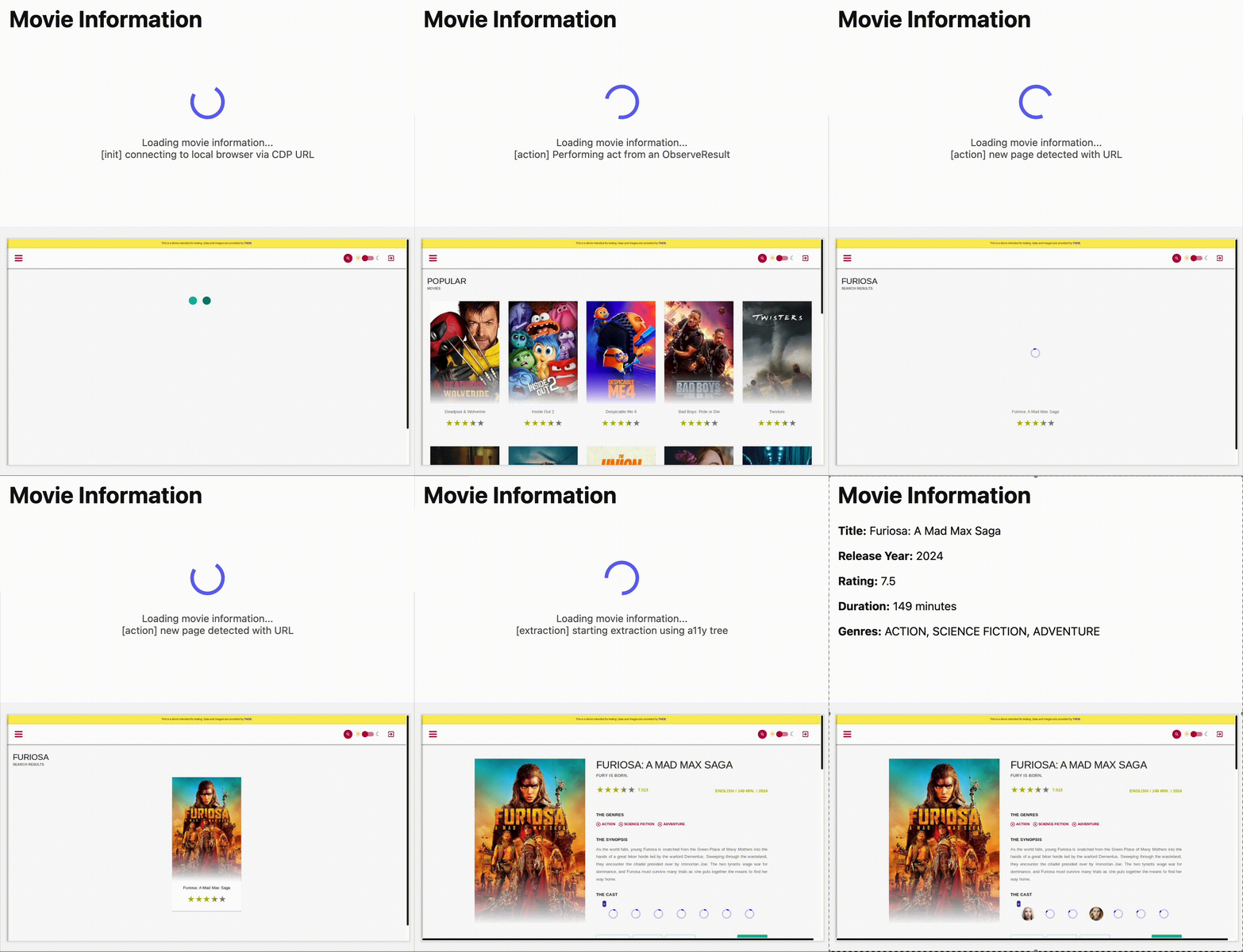
To get started with Stagehand, refer to the Stagehand example that uses Stagehand and Workers AI to search for a movie on this example movie directory, extract its details using natural language (title, year, rating, duration, and genre), and return the information along with a screenshot of the webpage.

Stagehand examplets
const stagehand = new Stagehand({
	env: "LOCAL",
	localBrowserLaunchOptions: { cdpUrl: endpointURLString(env.BROWSER) },
	llmClient: new WorkersAIClient(env.AI),
	verbose: 1,
});

await stagehand.init();
const page = stagehand.page;

await page.goto("https://demo.playwright.dev/movies");

// if search is a multi-step action, stagehand will return an array of actions it needs to act on
const actions = await page.observe('Search for "Furiosa"');
for (const action of actions) await page.act(action);

await page.act("Click the search result");

// normal playwright functions work as expected
await page.waitForSelector(".info-wrapper .cast");

let movieInfo = await page.extract({
	instruction: "Extract movie information",
	schema: z.object({
		title: z.string(),
		year: z.number(),
		rating: z.number(),
		genres: z.array(z.string()),
		duration: z.number().describe("Duration in minutes"),
	}),
});

await stagehand.close();
Stagehand video

AI Search (formerly AutoRAG) now with More Models To Choose From

AutoRAG is now AI Search! The new name marks a new and bigger mission: to make world-class search infrastructure available to every developer and business.

With AI Search you can now use models from different providers like OpenAI and Anthropic. By attaching your provider keys to the AI Gateway linked to your AI Search instance, you can use many more models for both embedding and inference.

To use AI Search with other model providers:

  1. Add provider keys to AI Gateway
    1. Go to AI > AI Gateway in the dashboard.
    2. Select or create an AI gateway.
    3. In Provider Keys, choose your provider, click Add, and enter the key.
  2. Connect a gateway to AI Search: When creating a new AI Search, select the AI Gateway with your provider keys. For an existing AI Search, go to Settings and switch to a gateway that has your keys under Resources.
  3. Select models: Embedding models are only available to be changed when creating a new AI Search. Generation model can be selected when creating a new AI Search and can be changed at any time in Settings.

Once configured, your AI Search instance will be able to reference models available through your AI Gateway when making a /ai-search request:

export default {
  async fetch(request, env) {
    
    // Query your AI Search instance with a natural language question to an OpenAI model
    const result = await env.AI.autorag("my-ai-search").aiSearch({
      query: "What's new for Cloudflare Birthday Week?",
      model: "openai/gpt-5"
    });

    // Return only the generated answer as plain text
    return new Response(result.response, {
      headers: { "Content-Type": "text/plain" },
    });
  },
};

In the coming weeks we will also roll out updates to align the APIs with the new name. The existing APIs will continue to be supported for the time being. Stay tuned to the AI Search Changelog and Discord for more updates!

Run more Containers with higher resource limits

You can now run more Containers concurrently with higher limits on CPU, memory, and disk.

Limit New Limit Previous Limit
Memory for concurrent live Container instances 400GiB 40GiB
vCPU for concurrent live Container instances 100 20
Disk for concurrent live Container instances 2TB 100GB

You can now run 1000 instances of the dev instance type, 400 instances of basic, or 100 instances of standard concurrently.

This opens up new possibilities for running larger-scale workloads on Containers.

See the getting started guide to deploy your first Container, and the limits documentation for more details on the available instance types and limits.

Refine DLP Scans with New Body Phase Selector

You can now more precisely control your HTTP DLP policies by specifying whether to scan the request or response body, helping to reduce false positives and target specific data flows.

In the Gateway HTTP policy builder, you will find a new selector called Body Phase. This allows you to define the direction of traffic the DLP engine will inspect:

  • Request Body: Scans data sent from a user's machine to an upstream service. This is ideal for monitoring data uploads, form submissions, or other user-initiated data exfiltration attempts.
  • Response Body: Scans data sent to a user's machine from an upstream service. Use this to inspect file downloads and website content for sensitive data.

For example, consider a policy that blocks Social Security Numbers (SSNs). Previously, this policy might trigger when a user visits a website that contains example SSNs in its content (the response body). Now, by setting the Body Phase to Request Body, the policy will only trigger if the user attempts to upload or submit an SSN, ignoring the content of the web page itself.

All policies without this selector will continue to scan both request and response bodies to ensure continued protection.

For more information, refer to Gateway HTTP policy selectors.

Sign in with GitHub

Cloudflare has launched sign in with GitHub as a log in option. This feature is available to all users with a verified email address who are not using SSO. To use it, simply click on the Sign in with GitHub button on the dashboard login page. You will be logged in with your primary GitHub email address.

For more information

SSO for all

Single sign-on (SSO) streamlines the process of logging into Cloudflare for Enterprise customers who manage a custom email domain and manage their own identity provider. Instead of managing a password and two-factor authentication credentials directly for Cloudflare, SSO lets you reuse your existing login infrastructure to seamlessly log in. SSO also provides additional security opportunities such as device health checks which are not available natively within Cloudflare.

Historically, SSO was only available for Enterprise accounts. Today, we are announcing that we are making SSO available to all users for free. We have also added the ability to directly manage SSO configurations using the API. This removes the previous requirement to contact support to configure SSO.

For more information

R2 Data Catalog now supports compaction

You can now enable automatic compaction for Apache Iceberg tables in R2 Data Catalog to improve query performance.

Compaction is the process of taking a group of small files and combining them into fewer larger files. This is an important maintenance operation as it helps ensure that query performance remains consistent by reducing the number of files that needs to be scanned.

To enable automatic compaction in R2 Data Catalog, find it under R2 Data Catalog in your R2 bucket settings in the dashboard.

compaction-dash

Or with Wrangler, run:

npx wrangler r2 bucket catalog compaction enable <BUCKET_NAME>  --target-size 128 --token <API_TOKEN>

To get started with compaction, check out manage catalogs. For best practices and limitations, refer to about compaction.

WAF Release - 2025-09-24 - Emergency

This week highlights a critical vendor-specific vulnerability: a deserialization flaw in the License Servlet of Fortra’s GoAnywhere MFT. By forging a license response signature, an attacker can trigger deserialization of arbitrary objects, potentially leading to command injection.

Key Findings

  • GoAnywhere MFT (CVE-2025-10035): Deserialization vulnerability in the License Servlet that allows attackers with a forged license response signature to deserialize arbitrary objects, potentially resulting in command injection.

Impact

GoAnywhere MFT (CVE-2025-10035): Exploitation enables attackers to escalate privileges or achieve remote code execution via command injection.

RulesetRule IDLegacy Rule IDDescriptionPrevious ActionNew ActionComments
Cloudflare Managed Ruleset100787Fortra GoAnywhere - Auth Bypass - CVE:CVE-2025-10035N/ABlockThis is a New Detection

Invalid Submissions Feedback

Email security relies on your submissions to continuously improve our detection models. However, we often receive submissions in formats that cannot be ingested, such as incomplete EMLs, screenshots, or text files.

To ensure all customer feedback is actionable, we have launched two new features to manage invalid submissions sent to our team and user submission aliases:

  • Email Notifications: We now automatically notify users by email when they provide an invalid submission, educating them on the correct format. To disable notifications, go to Settings > Invalid submission emails and turn the feature off.
EmailSec-Invalid-Submissions-Toggle
  • Invalid Submission dashboard: You can quickly identify which users need education to provide valid submissions so Cloudflare can provide continuous protection.
EmailSec-Invalid-Submissions-Dashboard

Learn more about this feature on invalid submissions.

This feature is available across these Email security packages:

  • Advantage
  • Enterprise
  • Enterprise + PhishGuard

Improved support for running multiple Workers with `wrangler dev`

You can run multiple Workers in a single dev command by passing multiple config files to wrangler dev:

wrangler dev --config ./web/wrangler.jsonc --config ./api/wrangler.jsonc

Previously, if you ran the command above and then also ran wrangler dev for a different Worker, the Workers running in separate wrangler dev sessions could not communicate with each other. This prevented you from being able to use Service Bindings and Tail Workers in local development, when running separate wrangler dev sessions.

Now, the following works as expected:

# Terminal 1: Run your application that includes both Web and API workers
wrangler dev --config ./web/wrangler.jsonc --config ./api/wrangler.jsonc

# Terminal 2: Run your auth worker separately
wrangler dev --config ./auth/wrangler.jsonc

These Workers can now communicate with each other across separate dev commands, regardless of your development setup.

./api/src/index.tsjs
export default {
	async fetch(request, env) {
		// This service binding call now works across dev commands
		const authorized = await env.AUTH.isAuthorized(request);

		if (!authorized) {
			return new Response("Unauthorized", { status: 401 });
		}

		return new Response("Hello from API Worker!", { status: 200 });
	},
};

Check out the Developing with multiple Workers guide to learn more about the different approaches and when to use each one.